Getting Started with NVIDIA VPI: From Concepts to Real Pipelines
Introduction
Building computer vision applications — whether for robots, drones, or smart surveillance systems — often involves repeating the same processing blocks: resizing, denoising, optical flow, and feature tracking.
However, the real challenge lies in deciding which hardware should execute each operation efficiently.
On NVIDIA Jetson platforms, developers have multiple compute options — GPU, VIC, PVA, and OFA — while x86 systems may only rely on CPU and GPU. Manually optimizing for each backend is complex and time-consuming.
That’s where NVIDIA VPI (Vision Programming Interface) changes the game. It’s a unified framework that lets you design and execute vision pipelines across multiple hardware backends without rewriting your code.
This blog walks through the core concepts, pipeline structures, and optimization strategies for using NVIDIA VPI — helping you go from concept to deployment with real-world efficiency.
💡 Want to accelerate your vision project with NVIDIA Jetson?
Our embedded AI experts at AI India Innovations can help you design and deploy optimized pipelines for robotics, industrial, and smart city applications.
What is NVIDIA VPI?
NVIDIA VPI (Vision Programming Interface) is a cross-platform computer vision framework that abstracts multiple hardware accelerators under a single API.
It allows developers to:
- Write code once and execute it seamlessly across CPU, GPU, VIC, PVA, or OFA.
- Combine pre-optimized algorithms for image processing, motion tracking, and geometry correction.
- Build high-performance vision pipelines with minimal latency and maximum efficiency.
Essentially, VPI helps developers focus on vision logic, not low-level optimization — making it ideal for both prototyping and production-grade applications.
Where Can You Use VPI? (Applications Map)
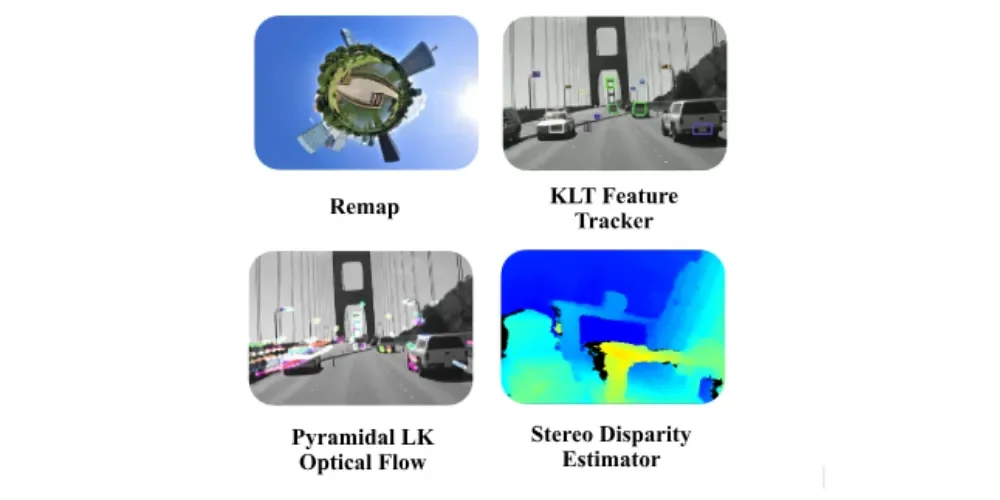
VPI offers 40+ pre-optimized vision algorithms categorized into filtering, geometry, motion, features, and stereo vision. Below is how VPI fits into different sectors:
| Sector | Pipeline Type | VPI Blocks | Best Backend |
|---|---|---|---|
Industrial Quality Control |
Geometry-first |
Resize, colour convert, morphology, edge detection |
VIC + CUDA |
Robotics/SLAM |
Feature-first |
Lens correction, Harris/FAST, KLT, Optical Flow |
PVA + GPU |
Surveillance/Traffic |
Motion-first |
Background Subtraction, Morphology, Dense Optical Flow |
VIC + OFA |
AR/VR |
Geometry-first |
Undistort, AprilTag, Pose Estimation |
CUDA + VIC |
Stereo Vision |
Stereo-first |
Remap, Stereo Disparity, Filtering |
CUDA + PVA |
Medical Imaging |
Preprocess-first |
Denoise, Histogram Equalization, Registration |
CPU + CUDA |
💡 Tip: Always start by identifying your pipeline pattern, then choose algorithms and hardware accordingly.
Core Concepts in VPI (Simplified)
Before writing your first VPI application, understand these key concepts:
- Stream: The sequence of operations (API: VPIStream) — like an assembly line.
- Payload: The algorithm or operation (e.g., Gaussian filter, KLT tracker).
- Backend: The hardware used for execution (CPU, CUDA, VIC, PVA, OFA).
- Event: Synchronization mechanism ensuring each stage completes before the next begins.
Once you grasp this structure, designing pipelines becomes intuitive and scalable.
Pipeline Patterns: Choosing the Right Flow
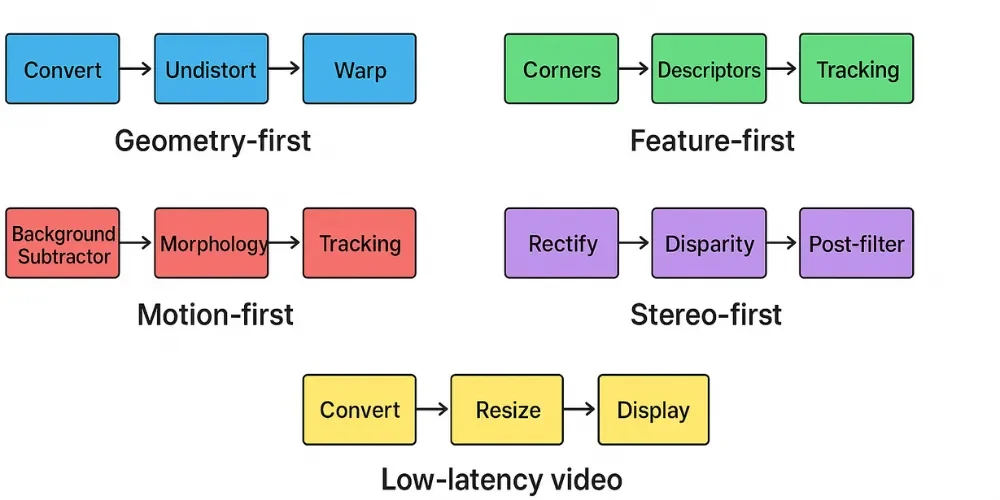
Depending on your use case, you can choose one of several pipeline archetypes:
- Geometry-first: Calibration, undistortion, warping (used in AR/VR and industrial QC)
- Feature-first: Corner detection, tracking, mapping (used in robotics and SLAM)
- Motion-first: Background subtraction + optical flow (used in surveillance)
- Stereo-first: Rectification + disparity estimation (used in depth perception)
Low-latency video: Resize + color convert + display (used in real-time streaming)
💡 Our Jetson specialists can help optimize your vision stack by choosing the right pipeline shape for your application.
Universal Beginner Pipeline (Python Example)
A simple starter pipeline in Python using VPI might include:
- Load image or video stream
- Apply vpi.ImageFormat conversion
- Perform resizing or denoising
- Execute optical flow or feature tracking
- Display or export processed frames
You can easily adapt this pattern:
- For motion detection → use pyramidal_lk_optical_flow()
- For stereo depth → use stereo_disparity_estimator()
For augmented reality → integrate apriltag_detector_and_pose()
Optimization in Practice
VPI automatically selects the best backend for each operation — drastically improving performance.
Key Insights
- Resize & Color Convert → VIC (2–3× faster than CPU)
- Optical Flow → OFA (dedicated low-power accelerator)
- Feature Tracking → PVA (optimized for real-time robotics)
- Filters & Histograms → GPU (CUDA)
Example: Resizing a 1080p frame
- CPU: 15 ms
- VIC: 5 ms → 3× faster, no code rewrite required!
⚡ Want expert help designing optimized VPI pipelines? Our AI Solutions team can help accelerate your Jetson workflows.
| Operation (1080p) | CPU | CUDA GPU | VIC | VPA | OFA |
|---|---|---|---|---|---|
Image Resize |
15 ms |
6 ms |
4 ms |
– |
– |
Harris Corners |
30 ms |
8 ms |
– |
5 ms |
– |
Dense Optical Flow |
– |
40 ms |
– |
– |
6 ms |
Ready-to-Use VPI Pipeline Recipes
Here are five pipeline blueprints you can adapt directly to your use case:
- Surveillance (Motion-first): Background subtraction + optical flow + tracking
- Robotics (Feature-first): Lens correction + Harris + KLT tracking + mapping
- Stereo Navigation: Rectify → disparity → depth map
- AR/VR (Geometry-first): Undistort → AprilTag detection → pose estimation
- Low-light Video (Preprocess-first): Denoise → histogram equalization → enhancement
Each can be customized and scaled depending on your application’s latency and accuracy goals.
Resources to Explore
If you’ve used OpenCV, think of VPI as “OpenCV with hardware awareness.”
Design your pipeline by pattern, choose optimal backends, and let VPI handle the acceleration.
💡 Next Step:
Replace one OpenCV operation in your project with a VPI equivalent — benchmark the difference. You’ll likely see significant performance and power savings.
Partner With Us
At AI India Innovations, we specialize in building hardware-optimized computer vision pipelines for NVIDIA Jetson and x86 platforms. Whether you’re developing industrial automation, robotics, or smart surveillance systems, our experts help integrate VPI, CUDA, and DeepStream for peak efficiency and real-time performance. You can also read about our other Blogs on our website.