
n8n and Hermes Agent:
A Practical Guide to Automation and AI Agents
Introduction
Automation software increasingly mixes fixed workflows with AI systems that can choose their next action. n8n and Hermes Agent illustrate those two patterns. n8n provides a visual way to connect services and define a sequence of steps. Hermes Agent centers on a model-driven assistant that can use tools, retain selected context and apply reusable skills. Both can involve AI and external services, but they organize work differently. For businesses, this distinction becomes especially useful when workflow automation is combined with AI-driven reasoning rather than treated as a replacement for it.
This guide explains what each does, how their features compare, when each is useful, how they can be connected and the operational controls that matter. Deployment is covered briefly because the concepts apply whether a system runs on a managed service, a local machine or private infrastructure. For implementation details, see the official n8n documentation and Hermes Agent documentation.
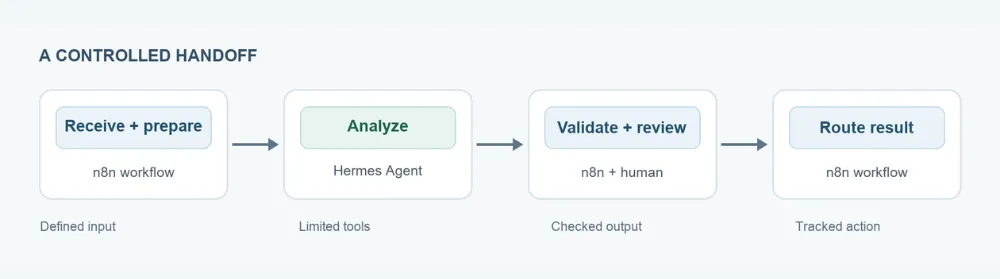
In brief: n8n is useful for explicit, observable process flows; Hermes Agent is useful for open-ended tasks that require interpretation and tool use. A workflow can also hand a bounded task to an agent, then validate and route its result.
What n8n does
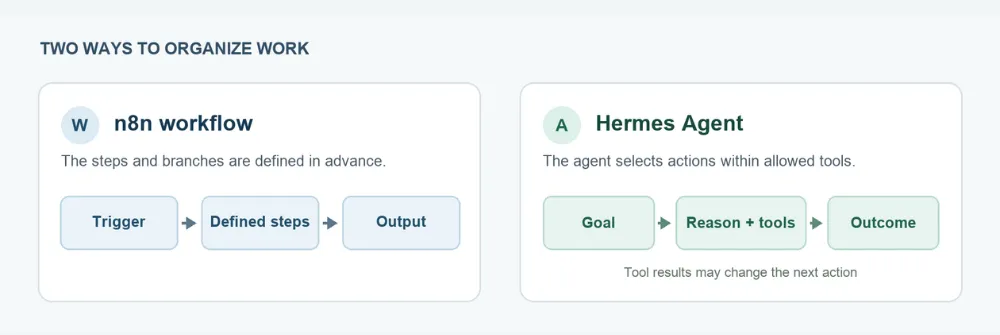
n8n is a workflow automation platform. It can host an AI Agent node that uses a chat model and connected tools, but a standard n8n workflow follows the steps and branches its builder defines.
Workflows, integrations and AI
n8n offers app-specific nodes as well as general HTTP requests and webhooks, so a team can connect services even when it lacks a dedicated integration. It also has an AI Agent node: a chat model can select from tools attached to that node within an otherwise defined workflow. This means an n8n workflow can include a model-driven step without making every step model-driven.
The conversation state depends on the workflow design. For example, n8n’s Simple Memory node stores chat history for an agent workflow, while other memory or database components can be used when the application needs durable or shared state. Simple Memory has a documented limitation in queue mode, so production designs should check the chosen memory component against their execution setup.
What Hermes Agent does
Hermes Agent is an AI agent project from Nous Research. Its core interaction is a request to an assistant that can reason over the task, choose tools, inspect results and continue until it has an answer or outcome. It can work through a command-line interface, desktop and messaging interfaces and an API server. The available tools and model provider depend on configuration.
Tools, skills and memory
Hermes can use built-in tools and external capabilities connected through Model Context Protocol (MCP). Skills provide reusable procedures for recurring work. Its built-in persistent memory uses curated files for agent notes and user preferences, loaded at the start of a new session; optional memory providers can extend that model. Memory is therefore a deliberate part of the agent's behavior, rather than a record of every fact it has ever seen. This same emphasis on tools, memory and controlled actions is central to practical AI agent implementation.
That flexibility brings variability. A prompt, model, tool result or retrieved page can change the path the agent takes. For tasks with strict outputs, define a narrow goal, a limited tool set and a way to check the result before another system acts on it.
Feature overview
The table summarizes product emphasis, not a winner. Both products can call APIs and use AI; the difference is where the control flow primarily lives.
| Dimension | n8n | Hermes |
|---|---|---|
Primary organizing unit |
A visual workflow made of connected nodes |
An agent session that selects tools as it works |
Typical starting point |
Trigger, schedule, webhook or manual run |
User request, message, scheduled task or API request |
Control flow |
Builder-defined sequence and branches; AI can be one |
Model-guided steps within configured tools and policies |
Integrations |
App nodes, HTTP requests, webhooks, workflow. |
Built-in tools, plugins, MCP servers and APIs |
Memory and state |
Execution data plus explicitly configured memory. |
Session context and curated persistent memory; optional providers |
Observability |
Workflow editor and execution history |
Conversation, tool activity, logs and agent state |
Deployment |
Managed n8n Cloud or self-hosted instance |
Installable agent with local or remote runtime options |
Practical use cases
Repeatable operational flows
n8n fits processes with known inputs, business rules and destinations: moving form submissions into a CRM, enriching records from an API, issuing notifications or routing an approval. Each step can be inspected and revised as the process changes. An AI node can help classify or summarize an item while the rest of the process stays explicit. This is the kind of structure that makes n8n workflow automation useful for repeatable business processes.
Open-ended assisted work
Hermes Agent fits tasks where the next step depends on what it discovers: investigating a technical issue, researching a topic across sources, drafting a plan from files or applying a familiar procedure through a skill. Tool permissions and review matter because an agent may encounter unexpected content or choose a different route than a human anticipated.
How they can work together
A useful pattern is to let n8n handle the event and the business process, while Hermes handles one bounded reasoning task. For example, n8n receives a support request, removes unneeded personal data, calls a protected Hermes API endpoint with the issue and a narrow instruction, validates the returned summary against required fields and sends the draft for human review before it is posted. This pattern is closely related to AI agent workflow automation, where the agent is one controlled part of a larger business process. n8n's HTTP Request node can call REST APIs; Hermes documents an authenticated API server.
The reverse direction is possible too: Hermes can send a structured request to an authenticated n8n webhook to start a defined workflow. The webhook can accept data, enforce a schema and return a limited result. This is an integration pattern inferred from the products' documented API and webhook capabilities, not a claim of a built-in one-click connector. A related practical example is an n8n AI Agent implementation where agent capabilities are used alongside defined workflow logic.
Keep the boundary small: specify the input, expected output format, timeout, allowed actions and failure path. Use a human approval point for messages, changes or transactions that carry material consequences.
Deployment in brief
n8n offers a managed Cloud service and self-hosting. Hermes Agent can be installed for local use or run with remote and container-backed options; its model and tool services are configured separately. The practical questions are where data travels, which system stores state, who maintains updates and what network access each integration needs.
Security and governance
Both systems can reach external services and sensitive data, so the connected tools deserve as much scrutiny as the application itself. n8n documents credential handling, webhook authentication, execution visibility and a security audit for common configuration risks. Hermes documents caller allowlists, command approval, sandbox options, credential protection and review of third-party skills and plugins.
- Grant each workflow or agent only the credentials and tools needed for its job. Separate test and production access where possible.
- Authenticate webhooks and API endpoints; restrict network exposure and rotate secrets. Avoid placing secrets in prompts, logs or copied workflow data.
- Treat external pages, emails and repository files as untrusted inputs. Validate agent output before it reaches a system of record or triggers a consequential action.
- Choose retention settings deliberately for execution logs, conversation history and memory. Review who can access them and how they are backed up or deleted.
Conclusion
n8n and Hermes Agent solve different problems. n8n gives you explicit, observable workflows for repeatable processes, while Hermes Agent handles open-ended tasks that need interpretation and tool use. Used together, n8n can own the trigger, validation and approvals while Hermes performs one bounded reasoning step. For businesses looking to apply this kind of architecture, n8n workflow automation can provide the surrounding process layer.
Start small: pick one process, define the input and expected output, limit the credentials and tools and add a human approval point before anything consequential happens. Expand only after you have checked realistic examples. A practical n8n AI Agent implementation can be a useful next step when the use case needs real-time tools alongside a defined workflow.
Technical details were checked against the official n8n and Hermes Agent documentation as of 28 September 2026. Features and interfaces can change, so confirm current documentation before implementation.
Frequently Asked Questions
n8n is a workflow automation platform. It can host an AI Agent node that uses a chat model and connected tools, but a standard n8n workflow follows the steps and branches its builder defines.
Hermes Agent can use tools to complete open-ended tasks, but repeatable business processes often benefit from explicit triggers, validation, approvals and execution records. The two approaches can be combined. For businesses implementing that combination, AI agent workflow automation can provide a structured way to connect agent reasoning with repeatable processes.
No. n8n offers managed Cloud and self-hosted options. Hermes Agent is installed and configured for a local or remote runtime, with model and tool services chosen separately.
Yes, through standard interfaces. An n8n HTTP Request node can call a protected Hermes API endpoint and Hermes can invoke an authenticated n8n webhook. Define a narrow payload and validate the response.