
How to Learn LangGraph: A Beginner’s Guide and Learning Roadmap
Introduction
LangGraph is a Python library for building AI agents as workflows. You draw your agent as a graph: every step is a node, and the arrows (called edges) decide what happens next. A shared state carries data from one step to the next.
It comes from the LangChain team. LangChain gives you building blocks like models and tools, while LangGraph controls the flow. You can use LangGraph without LangChain, but they fit together nicely.
Why learn LangGraph? Real agents need to loop, remember, wait for approval and recover from errors. LangGraph is made for exactly this. Many beginners get stuck because they jump straight to complex agents. This LangGraph learning roadmap goes one small step at a time.
What You Will Learn: In this guide, you will learn how to create graphs, manage state, add conditional routing, use memory, integrate tools, and build multi-agent workflows through simple, practical examples.
Prerequisites
Essential: Basic Python knowledge (functions, dictionaries, and classes), a simple understanding of LLMs, prompts, and tokens, and comfort with calling an API using an API key. Familiarity with installing Python packages and running scripts will also be helpful.
Optional: LangChain basics and asynchronous Python. You can learn these later as your projects become more advanced; do not wait for them to get started.
Set Up Your Environment
Use Python 3.10 or newer inside a virtual environment, then install LangGraph:
pip install -U langgraph python-dotenv
Keep your API key in a .env file, add that file to .gitignore, and never paste keys into your code. Install a model provider’s package, such as langchain-openai, only when you reach the LLM steps.
Your Step-by-Step LangGraph Learning Path
Spend a few days on each step. Do the practice part properly. That is where the learning happens.
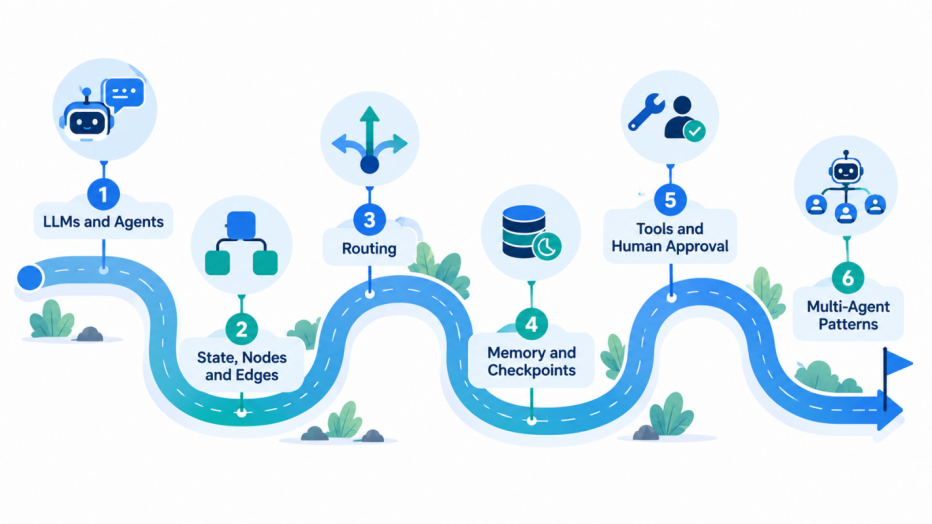
Step 1: Understand LLMs and agents (1–2 days)
Learn: An agent is an LLM that picks an action, uses a tool, checks the result and repeats.
Why it matters: LangGraph is simply a neat way to organise this loop.
Experiment: Call an LLM from a plain Python script. Then let it use one small function, like a calculator.
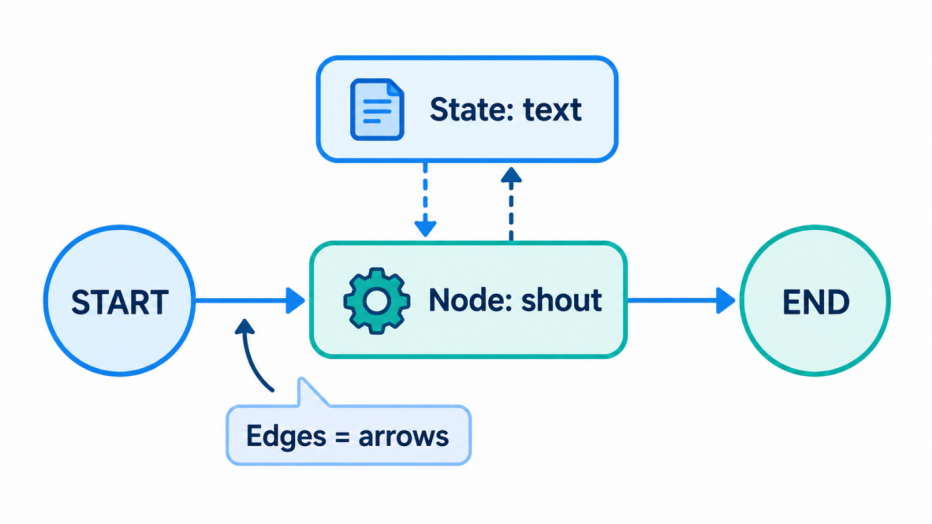
Step 2: Learn state, nodes and edges (2–3 days)
Learn: State is a shared notebook. A node is a Python function that reads the state and returns updates. Edges connect nodes between START and END.
Why it matters: Every LangGraph app is built from these three things.
from typing import TypedDict
from langgraph.graph import StateGraph, START, END
class State(TypedDict):
text: str
def shout(state: State):
return {"text": state["text"].upper()}
builder = StateGraph(State)
builder.add_node("shout", shout)
builder.add_edge(START, "shout")
builder.add_edge("shout", END)
graph = builder.compile()
print(graph.invoke({"text": "hello"}))
A good first step is to choose one process your team already follows, draw it as boxes and arrows, and turn it into a small graph. That drawing is already half the integration.
Experiment: Add two more nodes, one to count words and one to reverse the text. No LLM needed yet, so you learn the flow without spending money on API calls.
Step 3: Conditional routing (2–3 days)
Learn: A conditional edge looks at the state and chooses the next node.
Why it matters: This is how an agent makes decisions instead of following one fixed path.
Experiment: Build a mood replier. One node checks whether a message sounds happy or angry, and the graph routes it to a cheerful or a calm reply node. Start with simple keyword checks, then replace them with an LLM.
Step 4: State design and memory (3–4 days)
Learn: Reducers decide how updates merge into state, for example adding new messages to a list instead of overwriting it. A checkpointer saves state under a thread_id, so the graph remembers earlier turns.
Why it matters: Without memory, your chatbot forgets everything after each message.
Experiment: Make a chatbot that remembers your name. Then use a different thread_id and watch it forget.
Step 5: Tools, human approval and error handling (4–5 days)
Learn: Tool calling lets the model use functions like search. An interrupt pauses the graph until a human approves. Retries and fallbacks handle failures.
Why it matters: Real agents touch real systems. A pause before sending an email is very sensible.
Experiment: Build an agent that drafts an email and waits for your “yes” before “sending” it (just print it). Then make a tool fail on purpose and handle the error.
Step 6: Multi-agent patterns (1–2 weeks)
Learn: A supervisor agent gives work to specialists, such as a researcher and a writer. Subgraphs let you reuse one graph inside another. Streaming shows output as it is produced.
Why it matters: Big problems become easier when split into small, focused agents.
Experiment: Let a supervisor coordinate a researcher and a writer to produce a short note on any topic. Do not rush here; many apps never need this step.
A good first step is to choose one process your team already follows, draw it as boxes and arrows, and turn it into a small graph. That drawing is already half the integration.
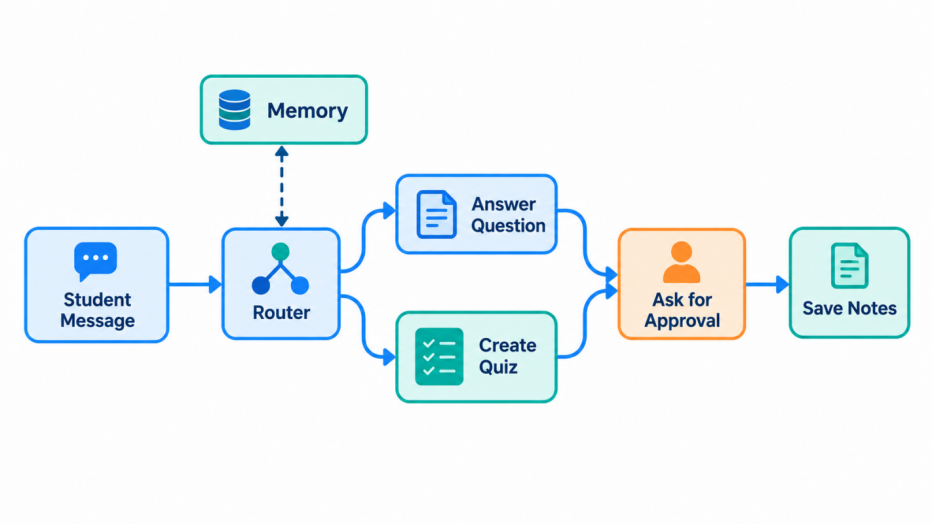
Small Project: Study Buddy Bot
This project combines Steps 2 to 5. A student types a message. A router decides whether it is a question or a quiz request. A question node answers it, while a quiz node asks three questions. Memory keeps track of topics discussed. Before saving notes, the bot asks for approval.
Build it in stages: routing first, then memory, then approval. Each stage should work before you add the next
Mistakes to Avoid and Where to Learn More
- Skipping Python basics, or building multi-agent systems on day one.
- Putting too much into state. Keep it small and clearly named.
- Following old tutorials without checking the current docs.
Start with the official LangGraph docs and the free “Introduction to LangGraph” course on LangChain Academy.
Build it in stages: routing first, then memory, then approval. Each stage should work before you add the next
Conclusion
LangGraph provides a structured way to build AI applications by connecting nodes, managing state, and controlling workflows. By understanding routing, memory, tools, and human approval, beginners can develop more reliable and practical AI agents. Start with simple graphs, experiment with real-world examples, and gradually explore multi-agent systems.
Frequently Asked Questions
You should have a basic understanding of Python, including functions, dictionaries, and classes. Familiarity with large language models (LLMs), prompts, API calls, and API keys is also helpful. LangChain basics and asynchronous Python are optional, so you can start learning LangGraph without mastering them first.
Start by understanding LLMs and AI agents, then learn state, nodes, and edges. Next, practise conditional routing, state management and memory, tool integration, human approval, and error handling. Explore multi-agent patterns after mastering the fundamentals. Building a small project, such as a Study Buddy Bot, helps you apply these concepts in practice.
No. You can use LangGraph without LangChain. LangChain provides components and integrations for building LLM applications, while LangGraph controls how tasks, decisions, and state flow through a workflow. Learning basic LangChain concepts can be helpful, but it is not a prerequisite for getting started with LangGraph.
Yes. Start with a simple graph containing a few nodes and edges, even without connecting an LLM. For example, you can create a Python function that converts text to uppercase, then add nodes to count words or reverse the text. Once you understand how graphs work, you can introduce routing, memory, tools, and more advanced agent patterns.
A Study Buddy Bot is a useful beginner project. It can route a student's message to either a question-answering workflow or a quiz workflow, remember previously discussed topics, and request approval before saving notes. Build it gradually by implementing routing first, then memory, and finally human approval.