How to Integrate LangGraph into AI Applications: Benefits and Use Cases
Introduction
Many companies already have an AI feature, such as a chatbot or a document reader. It looks impressive in a demo, but real customers ask messy, unexpected questions. The AI may need to check facts, use company tools, or stop and ask a person before it acts.
This is where LangGraph helps. It is an open-source Python framework that lets you design an AI application as a workflow. Each step is called a “node”, and the connections between steps decide what happens next. Integrating LangGraph simply means placing this workflow engine inside the product you already have.
Why Add LangGraph to an Existing AI Application?
A single prompt to an AI model is like giving one long instruction and hoping for the best. That works for simple tasks. It becomes risky when the job has many steps, such as checking an order, applying a refund policy and then writing a polite reply.
With LangGraph, the AI does the thinking and writing, while normal, predictable logic handles the rest. You also do not need to rebuild your application. Start with one workflow, see the results, and leave everything else untouched.
How to Integrate LangGraph: Step by Step
Let us use a simple example: a customer support assistant for an online store.
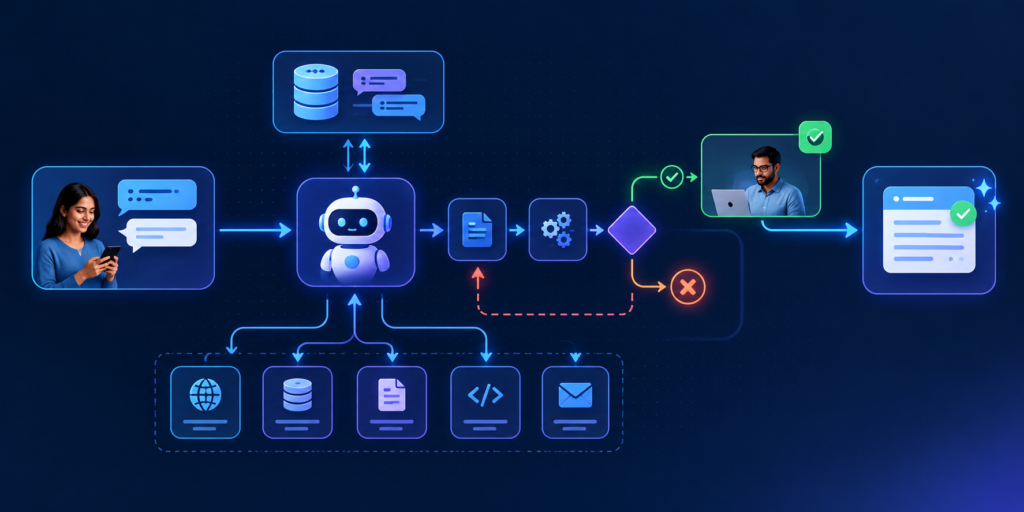
- Define the workflow: Before writing any code, draw the steps on paper. For example: understand the question, look up the order, decide whether a refund is needed, then write the reply. Each box becomes a node. Add simple rules for choosing a path, such as “refund requests go for approval”.
- Connect an LLM and tools: An LLM (large language model) is the AI that understands and writes text. Tools are ordinary functions it can call, like searching orders or reading a policy document. Keep every tool small, with one clear job, so mistakes are easy to find.
- Manage state: State is the shared notes that travel [through the workflow](https://aiindia.ai/ai-agent-workflow-automation/): the customer’s message, the order details and the draft reply. Add a checkpointer, which saves a snapshot of these notes, so a conversation can continue tomorrow or resume after a failure.
- Connect the graph to your application: Wrap the workflow in a small backend service, for example with FastAPI. Your website or mobile app then talks to it through an API, which is just a doorway that lets one piece of software talk to another. Send in the customer’s message and a conversation ID, and the reply comes back.
What it looks like in practice: A customer writes, “Where is my order, and can I get a refund?” Your app sends this to the API. The graph finds the order, sees that it is delayed, and drafts a reply. Because a refund is involved, it pauses and shows the draft to a support executive. Once approved, the reply goes out.
Test each step on its own before joining them. Four small working steps are far easier to fix than one giant prompt.
Key Benefits of Using LangGraph
- Better workflow control: You decide the order of steps and the rules for each path, so the AI cannot wander off-track.
- Memory: Saved state lets the assistant remember earlier messages. Customers do not have to repeat their problem again and again.
- Error handling: If a tool fails or times out, the workflow can retry, take another route or pass the case to a person. The customer sees a helpful answer instead of an error.
- Human approval: The workflow can pause before a sensitive action, like a refund, and continue only after a person says yes. This keeps people in charge of important decisions.
Real-World Use Cases
- Customer support: The assistant answers common questions and checks order status. Angry or complex cases go to a human agent along with the full conversation history.
- Business automation: Take leave requests or invoices. The workflow reads each request, checks company rules and asks a manager to approve unusual amounts.
- Research assistants: The agent searches several sources, checks whether the findings are good enough, searches again if needed, and then writes a short summary.
- Document processing: Read contracts, forms or bills, pull out key details such as names, dates and amounts, flag missing information and send doubtful cases for human review. Staff spend time only on the difficult ones.
Best Practices and Common Mistakes
Start small. Pick one workflow with clear value, such as order-status questions, instead of converting everything at once.
- Keep state simple: Store only what later steps truly need.
- Add approval for risky actions: Refunds, emails and data changes deserve a human check.
- Protect your keys: Keep API keys in environment variables, never inside code.
- Log and test: Record each step so you can see where things went wrong. Tracing tools such as LangSmith can help.
- Avoid over-engineering: Not every task needs many agents. A simple graph is often enough.
Keep the official LangGraph documentation handy, because the library keeps changing.
Conclusion
Consider LangGraph when your AI needs more than one answer. It suits tasks with several steps, tools, memory, approvals, or a need to recover from errors. If your application only answers simple questions, a single AI call may be enough.
A good first step is to choose one process your team already follows, draw it as boxes and arrows, and turn it into a small graph. That drawing is already half the integration.
Frequently Asked Questions
LangGraph helps build AI applications that need to perform multiple steps, use external tools, maintain context, or make decisions based on intermediate results. For example, a customer support agent can retrieve an order, check refund rules, and request human approval before processing a refund.
Start by identifying the workflow you want to manage. Define the workflow state, create nodes for individual tasks, connect them using sequential or conditional edges, and compile the graph. Then connect your language model, tools, and APIs, and expose the workflow through your application's backend. Test each step before deploying it.
LangChain provides components and integrations for building applications powered by large language models. LangGraph focuses on orchestrating stateful workflows with greater control over execution, branching, persistence, and human approval. They can be used together, and LangChain agents use LangGraph internally.
Yes. LangGraph supports short-term memory through checkpoints that preserve workflow state within a conversation thread. It also supports long-term memory through stores that retain selected information across conversations. These capabilities require the appropriate persistence configuration. <Cite refs={["turn421918search4","turn421918search13"]}/>
Yes. LangGraph can pause execution before a sensitive action so a person can review, approve, reject, or modify the proposed action. For example, a customer support workflow can wait for an employee to approve a refund before proceeding. The workflow can resume when the required human input is provided. <Cite refs={["turn421918search1","turn421918search9"]}/>