
Beyond Human Movement: Real-World Applications of AI Pose Estimation in Industrial Workshops
How ordinary cameras, body keypoints and edge AI are turning worker safety, ergonomics and productivity into measurable, fixable engineering problems.
A Tuesday Shift on the Fabrication Floor
It is 2:40 pm in a mid-sized metal fabrication shop. A worker lifts a 22 kg steel bracket from a low pallet, twists to place it on the press bed, and repeats the cycle. He has done this roughly 140 times today. Nothing looks wrong. No one is hurt. Yet his back is bending past 60 degrees on nearly every lift, and the supervisor — busy on the other side of the floor — will never see it.
This is the gap pose estimation fills. Not by replacing safety officers or judging workers, but by giving them something they have never had: a consistent, objective view of how bodies actually move on the shop floor, shift after shift. One awkward lift is a data point. The same rounded-back lift repeated 140 times a day, every day, is a finding — and a design problem waiting for an engineering fix.
What Is Pose Estimation, in Plain Terms?
Human pose estimation is a computer vision technique that locates a person's body joints in a video frame. The model needs no markers, no sensor suits and no wearables. It looks at ordinary camera footage — from a standard IP or USB camera — and outputs a set of points called keypoints, joined by lines: a digital skeleton that follows the worker through the scene.
A typical industrial model returns 17 keypoints per person, following the widely used COCO layout:
- Head: nose, eyes and ears
- Upper body: shoulders, elbows and wrists
- Lower body: hips, knees and ankles
Every keypoint carries an x, y image position and a confidence score. That is the entirety of the raw data. Everything useful comes from what you calculate with it.
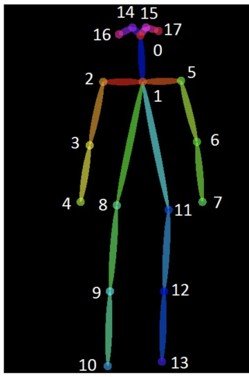
The COCO 17-keypoint skeleton: each numbered dot is a detected body joint, connected by limb segments. This is the raw material for every industrial application described in this article.
How Keypoints Become Insight
The commercial value of pose estimation is pure geometry. Any three keypoints define an angle, and angles define posture:
- Shoulder–hip–knee gives trunk bend: is the back flexed during a lift?
- Shoulder–elbow–wrist gives arm elevation and reach: are the hands working above shoulder height?
- Hip–knee–ankle gives knee flexion: is the worker squatting with bent knees or bending at the waist?
- Wrist position relative to hips and shoulders defines reach distance and the working zone.
- Hip and ankle positions over time yield movement paths, dwell time and walking distance.
Track these values across frames and posture, duration, repetition and speed all become measurable.
That is the moment body movement stops being an observation and becomes a dataset.
How the System Works on the Shop Floor
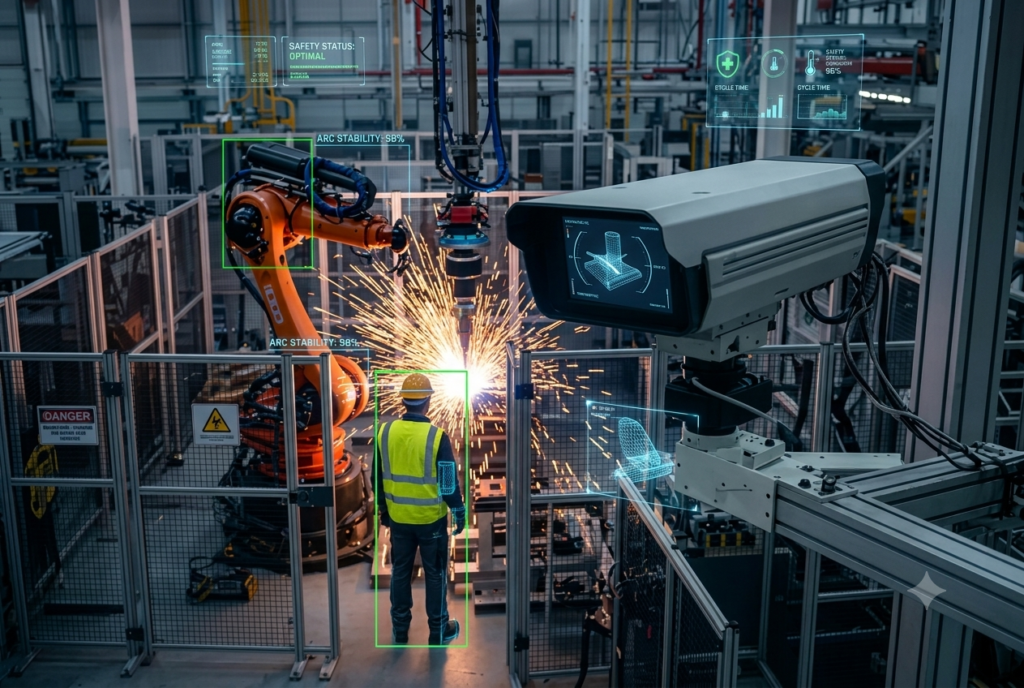
A practical deployment has four layers:
- Fixed industrial or standard IP/USB cameras, mounted above and angled toward work cells. One camera per station is usually the starting point; many sites reuse their existing CCTV.
- Edge inference. A pose model — typically a YOLO-family pose network — runs on a local device such as an NVIDIA Jetson, so video stays on site and latency stays in milliseconds.
- Rules and analytics. Keypoints are converted into angles, distances and durations, then checked against thresholds drawn from the company's own safety standards.
- Alerts, shift summaries and trend dashboards go to safety and operations teams.
Many sites prefer aggregated, anonymised reporting over live per-person alerts.
Five Real-World Use Cases
The following scenarios reflect how manufacturers are deploying pose estimation today — not as a theatre of futuristic robots, but as a practical measurement layer on the existing floor.
Use Case 1 — Worker Safety Monitoring
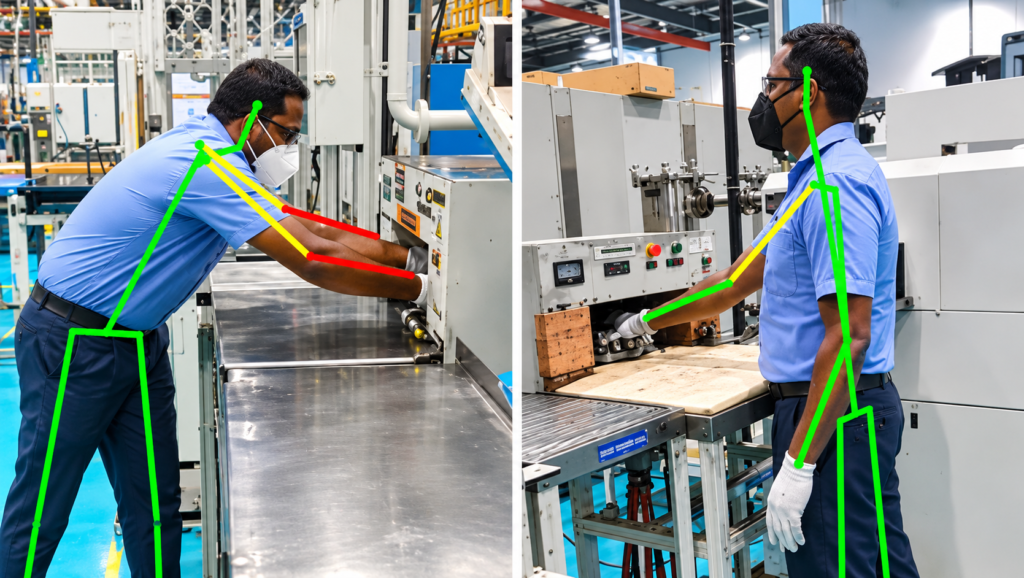
| Category | Description |
|---|---|
| Scenario | In a manufacturing workshop, workers operate heavy machinery, move between workstations, and perform tasks near potentially hazardous equipment. |
| What the system sees | Detects unsafe body positions, unusual movements, workers leaning too close to machinery, entering hazardous areas, and potentially dangerous interactions with equipment. |
| Outcome | Enables continuous safety monitoring, generates alerts when unsafe behavior is detected, and helps safety teams identify recurring workplace hazards before they lead to accidents. |
Use Case 2 — Ergonomic Analysis
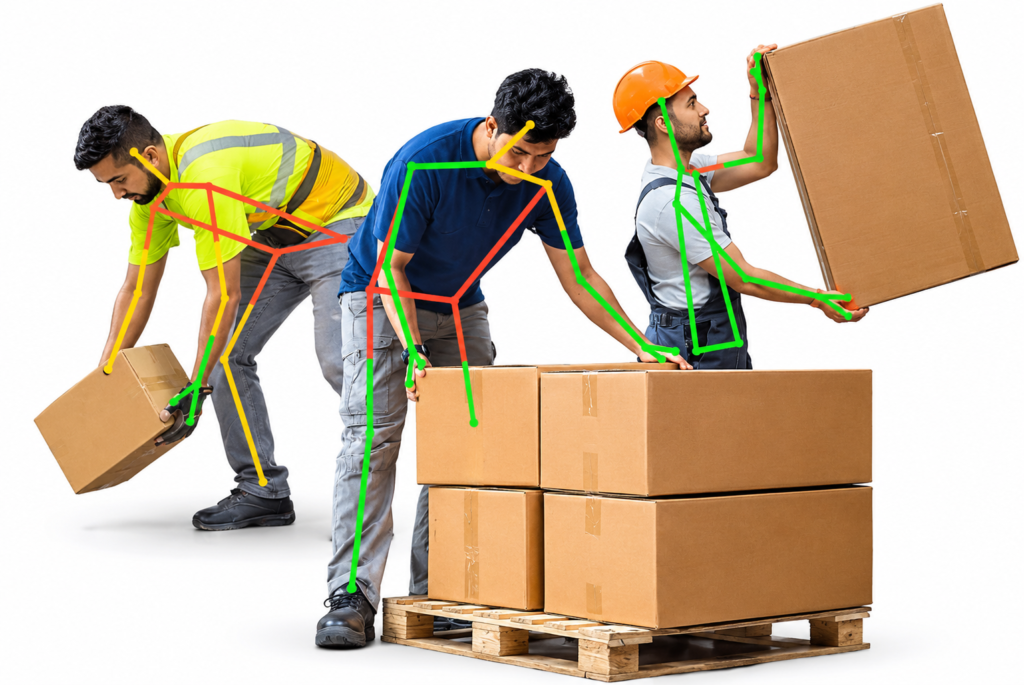
| Category | Description |
|---|---|
| Scenario | In a welding bay, operators routinely crouch beneath fixtures or lean over workpieces for long periods to access welding joints. |
| What the system sees | Detects sustained trunk flexion, forward neck tilt, kneeling, deep squats, and awkward body positions while tracking posture duration and workstation location. |
| Outcome | Identifies high-risk workstations, helping safety teams redesign fixtures, improve working conditions, reduce physical strain, and verify improvements using posture data. |
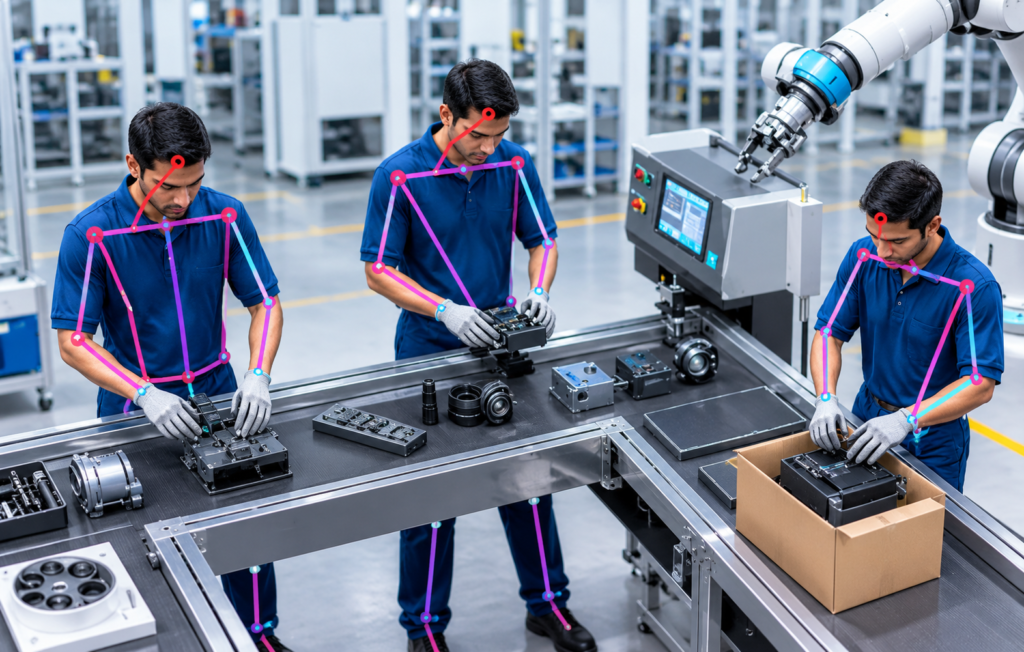
Use Case 3 — Assembly Procedure Verification
| Category | Description |
|---|---|
| Scenario | On an automobile or electronics assembly line, workers perform multiple assembly steps that must follow a specific sequence to maintain product quality. |
| What the system sees | Tracks body movements, hand positions, reaching patterns, and task-related actions to identify missed steps, incorrect movement sequences, or deviations from standard operating procedures. |
| Outcome | Helps supervisors identify process inconsistencies, improve assembly accuracy, reduce human errors, and maintain standardized manufacturing workflows. |
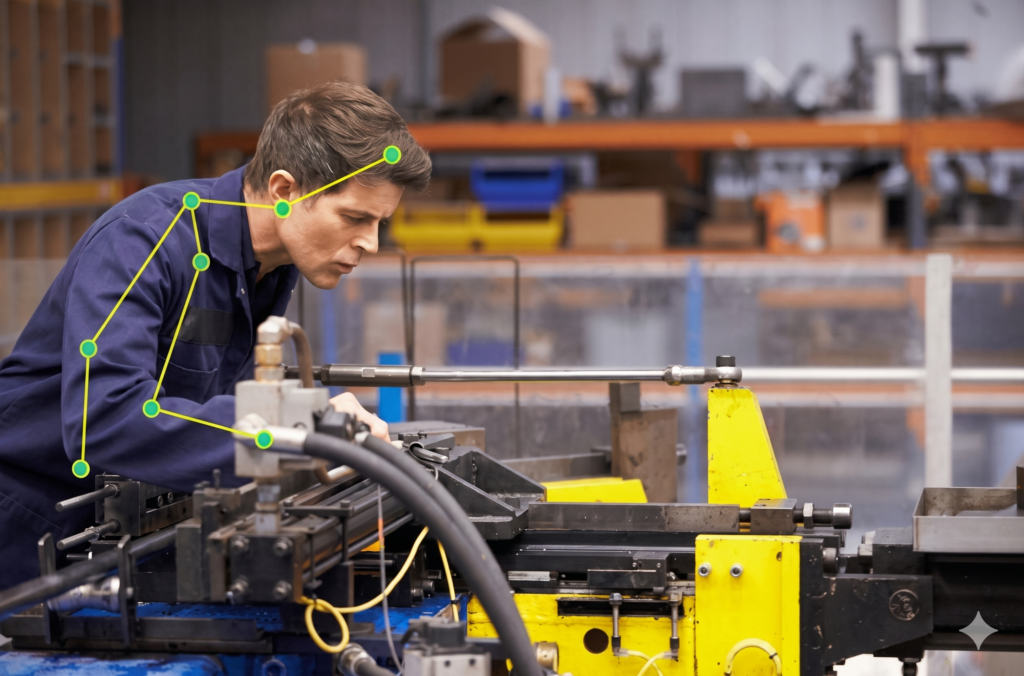
Use Case 4 — Machine Operation Monitoring
| Category | Description |
|---|---|
| Scenario | In an industrial workshop, operators interact with machines through control panels, levers, switches, and manual operating stations throughout production. |
| What the system sees | Monitors operator posture, hand movements, body positioning, and interaction patterns to identify unusual actions, incorrect operating sequences, or unsafe machine-handling behavior. |
| Outcome | Helps detect deviations from standard operating procedures, improves operational supervision, and supports early identification of potentially unsafe machine operation. |
Benefits
- Objective data on posture and movement that periodic audits cannot capture
- Continuous coverage across every shift, not a one-day snapshot
- No wearables — nothing to charge, forget, break or remove
- Process targeting — evidence for fixture, layout and workflow changes
- Works with existing cameras in many installations, keeping cost and disruption low
Limitations and Honest Caveats
- Machines, fixtures and other workers hide joints. Confidence scores drop and keypoints can jump between frames.
- Camera angle. Estimating trunk bend from a single 2D view is less reliable than from a side angle; depth ambiguity is real.
- PPE and clothing. Loose coveralls, aprons and bulky gloves shift keypoint accuracy, especially at wrists and ankles.
- Welding glare, deep shadows and low light must be tested on site — never assumed from lab results.
- Not a medical tool. Pose data indicates posture risk; it does not diagnose injury or replace a qualified ergonomist.
- Privacy and trust. Workers must know what is measured and why. Use aggregated reporting, clear policies, and consultation with employee representatives and legal teams. Skeleton-only storage — no raw video — sharply reduces privacy exposure.
- Alert thresholds should be validated against the site's own footage before going live.
What Comes Next
- Multi-camera 3D pose to resolve depth ambiguity at critical stations
- Action recognition layered on pose, so systems understand tasks — lifting, fastening, grinding — not just postures
- Fusion with other sensors: machine state, PLC signals and optional wearables
- On-device models compact enough for small edge hardware, keeping all data local
- Closed-loop use: posture data feeding workstation redesign and training, not only alerts
Conclusion
Pose estimation does not make a workshop safer on its own. What it does is make movement visible — how workers bend, reach, lift and position themselves around machines, across every shift, at every station. That visibility lets engineers fix a bench height, move a parts bin or redesign a guard based on evidence rather than guesswork.
Used with transparency and respect for the people it observes, pose estimation becomes a practical, affordable tool for safer and more efficient manufacturing. The most valuable output of a well-run deployment is rarely an alert. It is a better-designed workstation.
Frequently Asked Questions
Pose estimation can monitor workers' body positions and identify potentially unsafe postures, such as excessive bending, awkward reaching, or incorrect lifting techniques. This information can help safety teams identify risks and improve workplace safety practices.
Yes. By analysing keypoints such as shoulders, elbows, hips, knees, and ankles, pose estimation can help identify improper bending, unusual joint positions, and repetitive movements that may contribute to physical strain.
Yes. Camera-based pose estimation can analyse workers' body positions while they operate machinery. It can help identify unusual postures and support monitoring of workplace safety procedures. It should complement, not replace, certified machine safety systems.
Manufacturers can analyse worker movements, task execution patterns, and repetitive activities to identify unnecessary movements and potential workflow inefficiencies. This information can help improve workstation layouts and operational processes.
A typical system requires cameras, suitable lighting, a pose estimation model, and computing hardware such as an NVIDIA Jetson device or an industrial PC. Depending on the application, additional components such as monitoring dashboards, alert systems, and data storage may be integrated
About the Company
Company Name: AI India Innovations
Connect With Us
Interested in implementing AI-powered visual inspection solutions for your manufacturing process?
Email:connect@aiindia.ai