AI for CPAs:
Turning Document Chaos Into Clarity
Introduction
The Document Overload Every CPA Knows Too Well
Ask any accountant what actually eats up their week and the answer rarely has anything to do with numbers. It's paperwork. W-2s that arrive as blurry phone photos. 1099s buried in an inbox. Bank statements, P&L sheets and K-1s trickling in at the worst possible moment, right as filing deadlines close in.
For most firms, the real bottleneck isn't skill. It's the sheer volume of documents that have to be opened, checked, typed out and tracked, one at a time, for every single client. It's the kind of work that eats hours without ever showing up on an invoice.
This is exactly the gap an AI-powered document platform for CPA firms was built to close. In its newest version, it's gone from being a simple place to upload files to something closer to a genuinely helpful assistant, one that reads documents, answers questions and keeps everything organized, so the people running the practice can get back to the work that actually needs a human.
What Does a Platform Like This Actually Do?
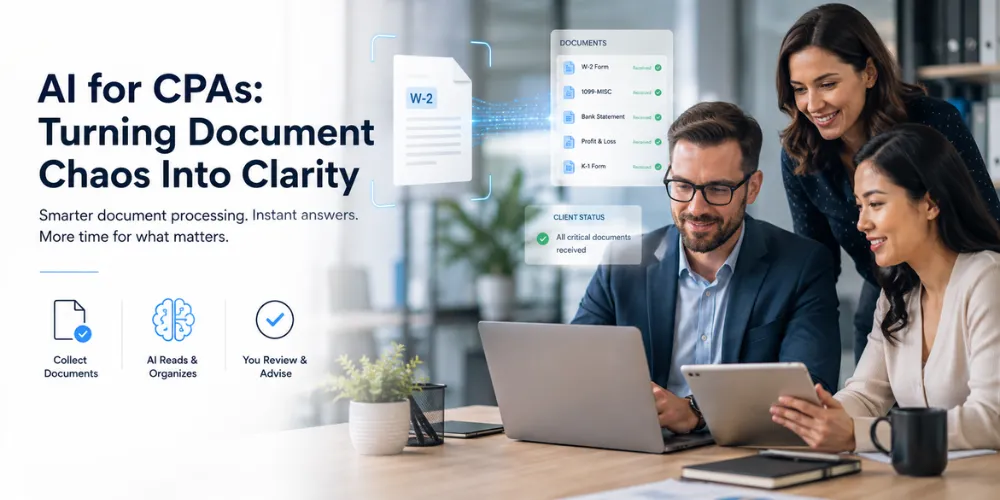
At its core, it's a secure online space where clients and their accountants meet to handle tax season without the back-and-forth chaos. Clients sign up, see exactly what documents they still need to provide and upload them directly, whether that's a scanned W-2, a photo of a receipt or a business balance sheet.
On the other side, the accounting team reviews everything in one place: approving documents, leaving notes, setting timelines and sharing prepared returns for sign-off. Running quietly underneath all of it is the part that's changed the most: a set of AI tools that actually read organize and explain the documents flowing through the system.
What's Actually Changed: An AI Perspective
The earlier version of this platform did the basics: it let people upload files and gave staff a place to look at them. That was it. There was no automatic reading of documents, no assistant to answer questions and no reliable memory of who had approved what. Every one of those gaps is exactly what the redesign set out to close, with AI doing most of the heavy lifting.
Reading Documents
– Before: Every form had to be opened and typed out by hand.
– Now: AI reads and organizes each document automatically as it's uploaded.
Getting Answers
– Before: Clients waited on email replies to ask about their filing status.
– Now: A built-in assistant answers instantly, using the client's real, up-to-date file.
Approval Records
– Before: Decisions could disappear if a browser tab was closed or a device changed.
– Now: Every approval, rejection and note is saved permanently and safely.
Reading Different Forms
– Before: Every document type needed a person to recognize and sort it manually.
– Now: Automatically recognizes different form types, from W-2s to K-1s to business balance sheets.
Accountability
– Before: No record of who did what or when.
– Now: Every action is time-stamped and traceable, end to end.
Peace of Mind
– Before: Independent review found real gaps in how data was protected.
– Now: Rebuilt and independently reviewed before a single new feature was added.
Put simply, the earlier version stored documents. The current version understands them and remembers everything that happens to them along the way.
The Three-Step Way It “Reads” a Document
One of the most useful things happening behind the scenes is how the platform reads an uploaded document and pulls out the information a CPA actually needs, like names, amounts, tax years and form types, without anyone typing a single field by hand.
It works a bit like a careful assistant who tries the fastest method first and only reaches for more powerful tools when they're truly needed:
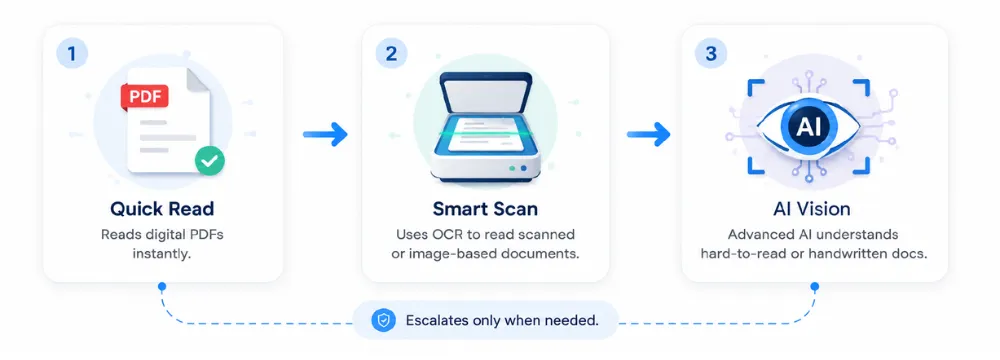
– Step one: the quick read. First, it tries to read the document directly, the way a computer reads a typed page. Most clean digital PDFs are handled instantly this way, at no extra cost.
– Step two: the smart scan. If a document is scanned or photographed rather than typed, it's scanned the way a smart photocopier would, recognizing the text on the page.
– Step three: true AI vision. For the genuinely tricky cases, like handwritten notes, low-quality scans or a photo taken at an angle, the platform brings in a more advanced AI model that can actually “look” at the page the way a person would and understand what it's seeing.
Because each step only escalates when it needs to, the vast majority of documents are processed instantly and for free and the more advanced (and more expensive) AI is saved for the small number of documents that genuinely require it. The result: faster turnaround for everyone, without cutting corners on the hard cases.
A Chat Assistant That Actually Knows Your File
Perhaps the most visible change is the addition of a built-in assistant and it comes in two flavors.
– For clients: A client can simply ask, “What documents am I still missing?” and get a real, accurate answer pulled straight from their own account, not a generic FAQ.
– For the accounting team: An accountant can ask something like, “What's new today?” and instantly see how many new clients signed up, how many documents are waiting on review and what just came in, without digging through folders or inboxes.
It's a small shift with a big effect: fewer emails asking about status, fewer phone calls chasing missing paperwork and faster answers for everyone involved.
Trust and Security Come First
None of this matters if client data isn't safe and that's exactly where the redesign started: not with the flashy AI features, but with a hard look at how information was being protected.
Today, every document a client uploads is private to that client alone. Every upload, approval, rejection and deletion is logged with a timestamp, so there's always a clear record of exactly what happened and when. Nothing is ever permanently erased without a trace and every part of the system went through an independent security review before any new feature was added on top of it, because trust, in this line of work, has to be earned before it's asked for.
Platform Features
Here's the full picture of what the platform actually does organized by the part of the workflow each feature supports.
Document Intake & Recognition
– Secure client upload portal: Clients upload files directly from a computer or snap a photo on their phone, no scanner required.
– Three-tier AI document reading: Direct text extraction for clean PDFs, OCR scanning for standard scans and full AI vision for handwritten or low-quality images.
– Multi-form recognition: Automatically identifies and sorts W-2s, 1099s (all variants), K-1s, Schedule Cs, bank statements, P&L statements and business balance sheets.
–For businesses handling recurring billing alongside accounting workflows, an invoice generator can also reduce the manual effort involved in creating and preparing invoices.
– Missing-document checklist: Each client sees exactly what's still outstanding, updated in real time as items are uploaded.
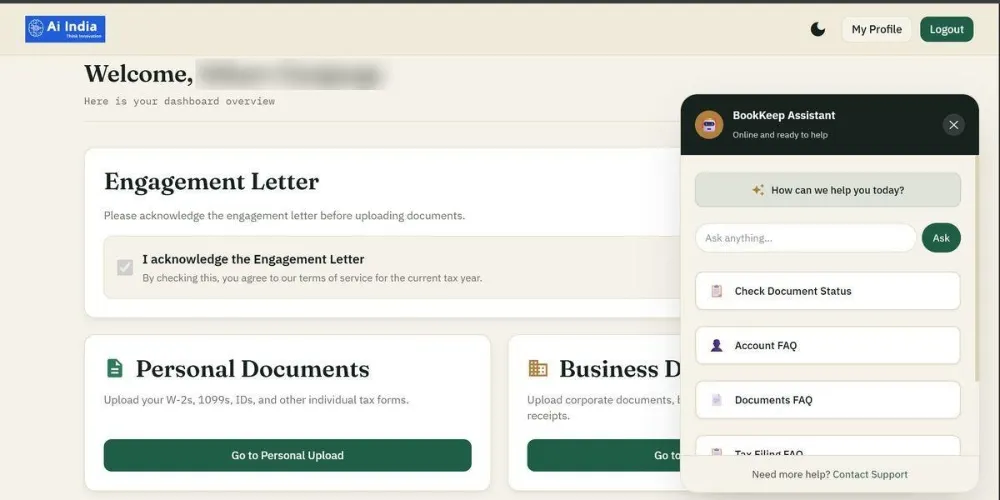
Client dashboard showing the upload portal, engagement letter acknowledgement and the BookKeep AI assistant ready to answer questions in real time.
AI Chat Assistant
– Client-facing assistant: Answers questions like “What documents am I still missing?” using the client's real, current file.
– Staff-facing assistant: Answers questions like “What's new today?” with a live summary of signups, pending reviews and new uploads.
– Natural-language search: Staff can ask about a specific client or document without digging through folders.
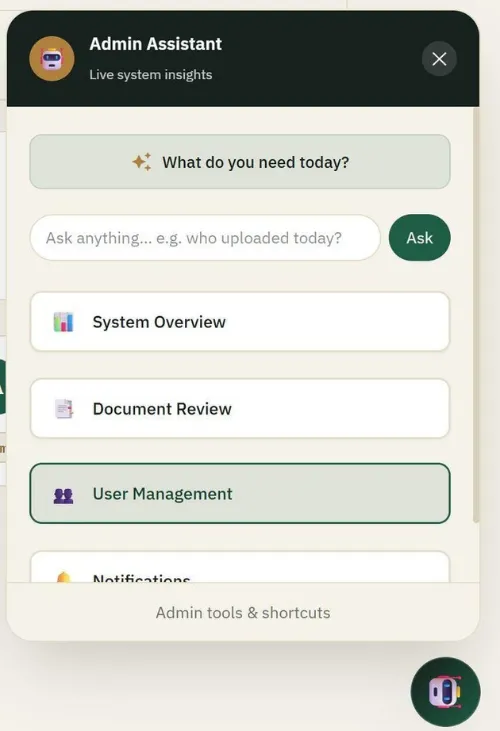
The Admin Assistant panel gives staff instant access to System Overview, Document Review, User Management and Notifications — all from a single chat interface.
Review, Approval & Collaboration
– One-place document review: Staff approve, reject and leave notes on documents without leaving the platform.
– Timeline and deadline tracking: Set and track filing timelines per client.
– Return sharing and sign-off: Prepared returns are shared directly with clients for review and approval.
– Persistent decision history: Approvals and rejections are saved permanently, not tied to a browser session or device.
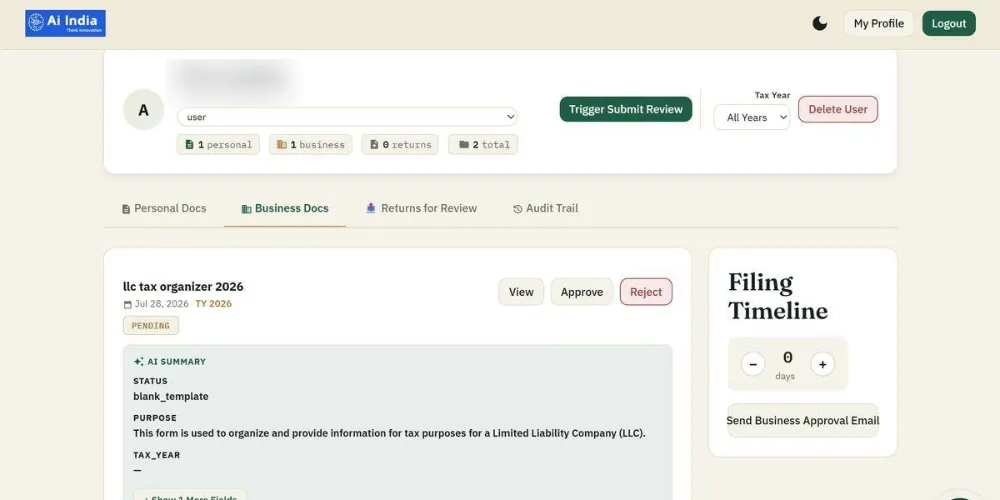
The admin document review view: approve or reject uploads, read the AI-generated summary of each file, track the filing timeline and send approval emails — all from one screen.
Security & Accountability
– Per-client data isolation: Every document is private to the client who uploaded it.
– Full activity logging: Every upload, approval, rejection and deletion is time-stamped and traceable.
– No silent deletion: Nothing disappears from the record without a trace.
– Independent security review: Completed before any AI feature was layered on top of the platform.
Firm Management
– Multi-client dashboard: A single view of every client's status across the firm.
– Scales with the firm: Works for a solo practitioner or a multi-office practice without changing the workflow.
– Cost-aware processing: Cheaper, faster methods are tried first and advanced AI is reserved for the documents that actually need it.
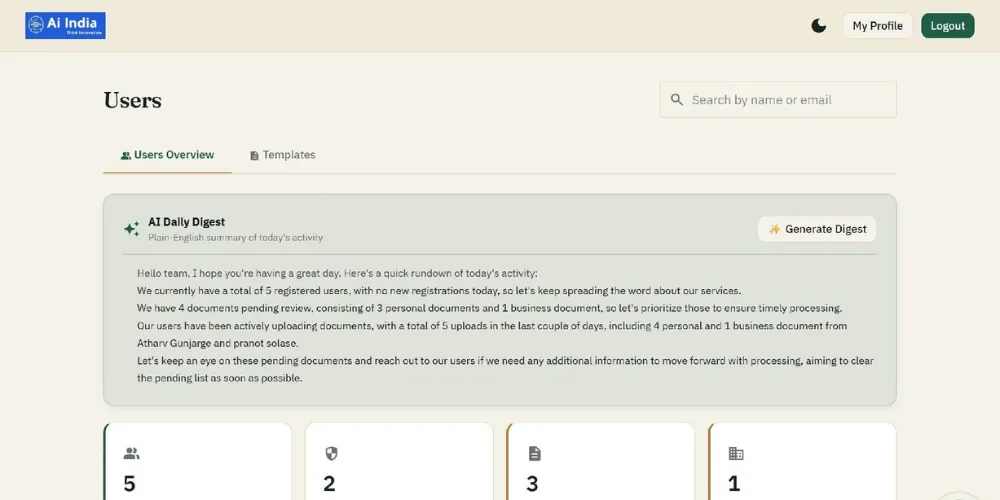
The Users Overview dashboard shows total users, admin accounts and pending documents at a glance, now with an AI Daily Digest that summarizes the firm's activity in plain English.
Technical Specifications
A closer look at how the platform is built and what it supports.
– Supported file formats: PDF, JPG, PNG, HEIC, TIFF
– Supported document types: W-2, 1099-NEC/MISC/INT/DIV, K-1, Schedule C, bank statements, P&L statements, balance sheets
– Document processing tiers: Tier 1 – direct text extraction (instant); Tier 2 – OCR scanning (seconds); Tier 3 – AI vision model for complex or handwritten pages
– AI assistant coverage: Client-facing Q&A and staff-facing daily activity summaries
– Access model: Per-client data isolation with role-based permissions for staff accounts
– Audit logging: Time-stamped record of every upload, approval, rejection and deletion
– Data retention: Permanent record retention; no silent or untracked deletion
– Security posture: Independent security review completed prior to feature rollout, with ongoing monitoring
– Hosting and access: Cloud-hosted, browser-based, accessible from desktop or mobile
– Firm size supported: Solo practitioners through multi-office firms
Our Approach to Building AI for Accounting
Building something like this for accounting firms takes more than general AI know-how. It takes a genuine understanding of how tax and accounting work actually operates. That's the approach we bring at AI India Innovation.
– Fluent in tax forms. We design platforms that recognize the full range of tax forms, including W-2s, 1099s, K-1s and Schedule Cs, treating each one correctly rather than as generic paperwork.
– Built around how CPA firms actually work. From document intake to client sign-off, we design workflows around the real day-to-day rhythm of an accounting practice, not a generic file-upload tool retrofitted for tax season.
– Security-first, not security-eventually. Before adding a single new AI feature, we run a full, honest review of how a platform protects client data, document exactly what needs fixing and fix it first.
– Built to actually stay running. Accounting firms can't afford downtime during filing season, so we build for reliability, recoverability and easy monitoring, not just a demo that works until it doesn't.
– Transparent, every step of the way. We share progress, risks and priorities openly throughout a build, rather than only surfacing them once something is finished, which matters enormously when the data involved is this sensitive.
That combination of technical depth, real familiarity with tax and compliance work and a security-first mindset is exactly what a platform handling real financial data for real people needs.
Why AI India Innovation
There's no shortage of software teams that can wire up an upload button and call it a client portal. Plenty of them will happily bolt on a chatbot too. What's harder to find is a team that actually understands why a K-1 gets handled differently from a W-2, why an approval trail matters when an audit comes around and why “good enough” isn't good enough when a client's refund or a firm's reputation is on the line. That's the gap AI India Innovation was built to close.
It shows up less in what gets said in a pitch and more in what gets built without being asked. Nobody had to explain that tax season can't tolerate downtime or that a firm needs to know exactly who approved what and when, months after the fact. Those weren't feature requests; they were assumptions baked in from the start, the kind that only come from actually understanding how a CPA firm's year works.
This platform is the clearest evidence of that. It didn't start as an AI showcase. It started as a plain upload tool and it became something that reads documents, organizes them and explains itself to clients and staff alike, without ever loosening its grip on security along the way. That's the harder version of the job: adding intelligence without adding risk. It's also the version that actually earns a firm's trust, one filing season at a time.
None of that requires trading away quality for cost. A global team doesn't mean a lower bar; it means the same standard a firm would expect from an engineer down the hall, applied by people who happen to work a few time zones away and take the deadline just as personally. And because tax season isn't a one-time event, the relationship isn't built to end at launch. Regulations shift, new forms show up, firms grow. The platform and the team behind it, are built to keep pace with all of it.
A Day in the Life: What This Actually Looks Like
Picture a client uploading a forty-page scanned partnership document from their phone, understandably a little blurry. The platform tries the quick read first, comes up short, tries the smart scan next, still not quite enough and finally calls in the advanced AI model, which reads the page and pulls out the partner's name, the relevant income figures and the tax year, all without anyone retyping a thing.
The accountant opens the file, sees the information already organized and waiting, adds a quick note and marks it approved. That decision is saved immediately: safely, permanently and visibly to the client. Later that day, the client logs in and asks the assistant, “What am I still missing?” and gets an instant, accurate answer. Meanwhile, the accountant asks her own assistant what's new and gets a live summary of the day's activity across every client, all without opening a single spreadsheet.
No chasing. No re-typing. No wondering where things stand. Just documents that get read organized and acted on, quickly and correctly.
AI for CPAs Isn't About Replacing Accountants
There's a tempting but lazy story about AI coming for accounting jobs. It misses the point. No firm has ever struggled because it lacked people who could add up a column of numbers. The real bottleneck has always been the noise around the work: chasing documents, retyping fields, answering the same question for the fifth time this week.
That's the noise a platform like this is built to absorb. It reads the documents, remembers what happened to them, answers the routine questions automatically and keeps everything secure, so that the accountants using it can spend their time where it actually counts: giving thoughtful, informed advice to the people who came to them for it in the first place.

Conclusion
Accounting firms don't need AI for AI's sake. They need fewer blurry W-2s slowing down the week, fewer status emails and a clear, permanent record of who approved what and when. That's the practical case for a platform like this: it takes over the repetitive, error-prone parts of document handling so the people on staff can focus on judgment calls that actually require a human.
Built with a security-first mindset, real fluency in tax forms and a genuine understanding of how CPA firms operate day to day, this is what AI India Innovation set out to deliver and what the platform's evolution from simple file storage to an intelligent, trustworthy assistant demonstrates in practice. For firms weighing whether AI belongs in their workflow, the answer isn't about replacing the people doing the work. It's about clearing the noise so they can get back to it.