Deploying Vision Language Models on NVIDIA Jetson Orin Nano
Bringing Visual Intelligence to the Edge
1. Can a Small Edge Device Understand Images?
Imagine connecting a camera to a compact device and asking it questions such as:
- What objects are visible in this image?
- Is there any visible damage to this component?
- Describe what is happening in this scene.
- What safety issues can you identify?
Instead of sending every image to a cloud server, what if the device itself could analyze the image and generate meaningful descriptions? This is the idea behind edge AI-powered Vision Language Models (VLMs) — models that combine computer vision and language processing, allowing machines to analyze images and respond to natural language prompts.
With devices such as the NVIDIA Jetson Orin Nano, selected multimodal AI capabilities can now run directly inside industrial environments, robotics systems, and smart surveillance applications. But deploying a VLM on an edge device is not as simple as running it on a data-center GPU: memory limits, model size, inference speed and optimization all play a decisive role. This guide walks through how it works — and how to do it well.
2 . Why Deploy a VLM on NVIDIA Jetson?
Traditionally, large AI models run on powerful cloud servers or desktop GPUs. Cloud processing, however, introduces network latency, bandwidth cost, ongoing infrastructure expense — and often means your images leave the building. Edge deployment inverts this: inference runs next to the camera or data source, on hardware like the Jetson Orin Nano, a compact ARM-based module with an integrated NVIDIA GPU, tensor cores and unified memory.

NVIDIA Jetson Orin Nano Developer Kit — an affordable platform that brings data-center-style AI tooling to the edge.
Key benefits of edge deployment
■ Low-latency processing: Visual data is analyzed locally — no round trip to a remote server.
■ Reduced cloud dependency: Applications keep working without continuous internet connectivity.
■ Data privacy: Images and video never have to leave the local environment — a major advantage for factories, clinics and public spaces.
■ Real-time response: Suitable for selected robotics, surveillance and industrial monitoring workloads.
■ Compact & cost-efficient: AI capability on a device small enough to mount on a robot arm or inside a control cabinet.
A realistic caveat: actual performance depends on model size, optimization quality, available memory and workload complexity. The Jetson Orin Nano is powerful for its class, but it is not a replacement for a data-center GPU — model selection matters more here than anywhere else.
3. Understanding the VLM Deployment Architecture
A typical image-to-text inference pipeline on Jetson follows these stages:
Camera / Image → Preprocessing → Vision Encoder → Multimodal Projector → LLM → Text Generation → Output

The canonical structure of a VLM: an image encoder and a text decoder meet at a multimodal fusion layer.
■ Image input: A camera frame or image file provides the visual information (USB, CSI, GigE or RTSP stream).
■ Preprocessing: The image is resized, normalized and patchified according to the model's requirements.
■ Vision encoder: A ViT-style network extracts visual features — essentially translating pixels into embeddings.
■ Multimodal projector: Aligns visual embeddings with the language model's token space (the key "adapter" component).
■ Language model: Fuses visual tokens with the user's text prompt and reasons about both.
■ Text generation: An autoregressive decoder emits a natural-language response, one token at a time.
Worked example. An industrial camera captures a machine component. The VLM receives the prompt "Describe the visible condition of this component" and might answer: "The image shows a metal component with a visible surface irregularity near its upper edge." That single capability turns a passive camera feed into a system that can generate descriptive, searchable, human-readable visual information.
ise
4. Choosing the Right VLM for Jetson
Not every VLM is suitable for edge deployment. Large multimodal models can demand tens of gigabytes of GPU memory, so selecting an appropriately sized model is the single most important deployment decision.
Models worth exploring for Jetson-class hardware include:
| Model | Size class | Description |
|---|---|---|
| Qwen2.5-VL | 3B (larger variants exist) | Strong multimodal model for image and video understanding; the 3B variant is the realistic Jetson choice. |
| LLaVA 1.6 | 7B base | Pioneering open VLM for visual question answering; typically requires aggressive quantization to run on Orin Nano. |
| SmolVLM | 256M / 500M | Compact VLM family from Hugging Face built specifically for resource-constrained and edge devices. |
| PaliGemma | 3B | Vision-language model from Google supporting captioning, VQA and multiple visual tasks. |
| MiniCPM-V | ~2B | Efficient VLM series known for strong OCR and detail recognition per parameter. |
For the Jetson Orin Nano, check five things before committing: model size, supported resolutions, GPU memory footprint (weights + KV cache + vision encoder), framework compatibility (Transformers, llama.cpp, TensorRT-LLM) and quantization support. A smaller, well-quantized model almost always beats a big unquantized one on edge hardware.
RULE OF THUMB
With 8 GB of unified memory, a 4-bit quantized 3B-class VLM (≈ 2 GB of weights) leaves comfortable headroom for the OS, the CUDA runtime, and the KV cache. A full-precision 7B model (≈ 14 GB+) simply will not fit.
5. Deploying a VLM on Jetson: The Practical Workflow
Step 1 — Prepare the Jetson environment
Flash the device with JetPack 6.x (Ubuntu 22.04 base with CUDA 12.x, cuDNN and TensorRT), then verify the software stack, power mode and memory headroom:
# Check JetPack / L4T version, CUDA and memory
cat /etc/nv_tegra_release
sudo tegrastats          # live CPU/GPU/RAM usage
sudo nvpmodel -m 0       # 25 W MAXN mode
sudo jetson_clocks       # lock clocks at max
TIP
jtop (the open-source system monitor) and tegrastats are the Jetson equivalents of nvidia-smi — desktop nvidia-smi only works on Jetson in limited form depending on the software environment.
Key benefits of edge deployment
■ Low-latency processing: Visual data is analyzed locally — no round trip to a remote server.
■ Reduced cloud dependency: Applications keep working without continuous internet connectivity.
■ Data privacy: Images and video never have to leave the local environment — a major advantage for factories, clinics and public spaces.
■ Real-time response: Suitable for selected robotics, surveillance and industrial monitoring workloads.
■ Compact & cost-efficient: AI capability on a device small enough to mount on a robot arm or inside a control cabinet.
A realistic caveat: actual performance depends on model size, optimization quality, available memory and workload complexity. The Jetson Orin Nano is powerful for its class, but it is not a replacement for a data-center GPU — model selection matters more here than anywhere else.
Step 2 — Select and prepare the model
Download a compatible pretrained VLM and review its requirements:
- Model size (parameters × precision = memory).
- Supported image resolutions and aspect ratios.
- Required dependencies (Transformers, llama.cpp, mmproj support).
- GPU memory consumption at your target context length.
- Supported inference frameworks and export formats.
Step 3 — Optimize the model
Optimization is essential on edge devices. The most effective levers, roughly in order of impact:
| Technique | What it does | Typical impact |
|---|---|---|
| Quantization | Store weights at 4–8 bit precision (GGUF, AWQ, GPTQ) | 2–4× less memory, faster decode |
| Reduced precision | Run matmuls in FP16 / INT8 via TensorRT | Higher tensor-core throughput |
| Resolution tuning | Cap input image resolution | Directly cuts vision-encoder cost |
| KV-cache limits | Constrain context length | Frees RAM during long sessions |
| Runtime choice | llama.cpp, Ollama or TensorRT-LLM | 2–3× vs. naive PyTorch eager mode |
For example, GGUF quantization can dramatically reduce memory requirements of supported models in llama.cpp-based runtimes (Ollama runs natively on Jetson). However, not every VLM converts cleanly to GGUF — many multimodal projectors still require the original framework or a specialized runtime.
Step 4 — Run image inference
Provide an image and a text prompt:
# Example with Ollama on Jetson ollama run qwen2.5vl:3b >>> Describe the objects and activities visible in this image. [attach image] → textual description |
Step 5 — Connect a live camera
After validating the model with static images, connect a USB camera such as the Logitech BRIO 100 webcam or an IP camera to the NVIDIA Jetson Orin Nano. OpenCV or GStreamer can be used to capture live video streams. The camera continuously captures frames, which can be selected and passed to the VLM for analysis. Processing every frame is usually computationally expensive, so a more practical approach is to analyze frames at scheduled intervals or trigger VLM inference
6.Challenges of Running VLMs on Jetson Orin
Deploying a VLM on an edge device introduces real engineering challenges. Knowing them upfront saves weeks:
■ Memory limitations: Large models can exceed the shared CPU/GPU memory pool; the OS, desktop and CUDA context all draw from the same budget.
■ Inference latency: Text generation is autoregressive — every token requires a full model pass, so long answers are slow even when image encoding is fast.
■ Model compatibility: Some VLMs need specific frameworks, CUDA versions or projector implementations; multimodal support in lightweight runtimes is still uneven.
■ Quantization trade-offs: Lower precision shrinks memory and speeds up decoding, but can subtly degrade spatial reasoning and fine-detail descriptions.
■ Thermal & power constraints: Sustained AI workloads demand attention to power modes, cooling and throttling under continuous load.
These challenges make model selection and benchmarking just as important as a successful installation. A deployment that "works" in a demo may still be too slow, too hot or too fragile for production.
7. Measuring Deployment Performance
A VLM deployment should never be evaluated only by whether it generates a response. Track these parameters:
| Metric | What it measures | How to measure |
|---|---|---|
| Model loading time | Time to load weights and warm up | Timestamp around model init |
| Time to first token | Delay before generation starts | Includes image encoding + prefill |
| Total inference latency | Time for the complete response | Wall clock, prompt → final token |
| Tokens per second | Decode speed during generation | tokens ÷ decode time |
| Memory consumption | RAM + GPU/shared memory usage | tegrastats / jtop during inference |
| Power draw | Energy requirement under load | INA sensors via tegrastats |
| Response quality | Accuracy & usefulness of descriptions | Human eval on representative images |
As a rough orientation (your numbers will vary with model, prompt length and JetPack version): expect multi-second time-to-first-token and single-digit to low-double-digit tokens per second from a quantized 3B-class VLM on Orin Nano — perfectly usable for event-triggered analysis, but not for captioning 30 fps video.
8. The Future of Visual Intelligence Is Moving to the Edge
The canonical structure of a VLM: an image encoder and a text decoder meet at a multimodal fusion layer.
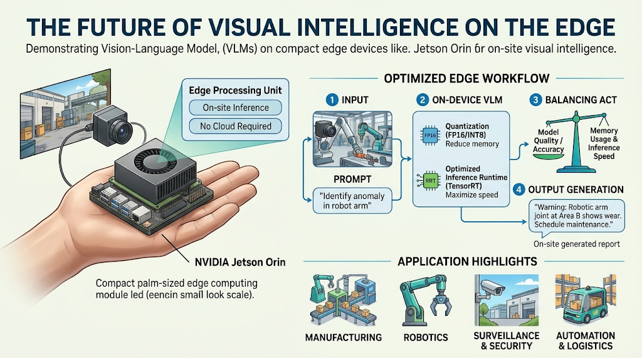
Deploying Vision Language Models on NVIDIA Jetson Orin shows how multimodal AI can move beyond cloud servers and into compact edge devices. With the right model, quantization and inference runtime, a palm-sized computer can analyze images and generate meaningful textual descriptions entirely on-site.
But successful deployment is not simply about fitting a model onto a device — it is about finding the right balance between model quality, memory usage, inference speed and application requirements. As edge AI evolves, combining VLMs with traditional, deterministic computer vision promises more intelligent systems for manufacturing, robotics, surveillance and automation.
The next generation of edge devices will not just capture what is happening around them — they will increasingly help us interpret what they see.
Frequently Asked Questions (FAQs)
Vision Language Models (VLMs) combine computer vision and natural language processing to understand images and generate meaningful responses. By deploying VLMs on NVIDIA Jetson Orin Nano, AI India Innovations helps businesses implement on-device visual intelligence through customized model deployment, optimization, and integration for manufacturing, robotics, and industrial automation.
Deploying VLMs on NVIDIA Jetson reduces network latency, bandwidth consumption, and cloud dependency while improving control over sensitive visual data. AI India Innovations develops customized Edge AI solutions that enable businesses to process images locally, improve operational efficiency, and implement intelligent monitoring systems without relying on continuous cloud connectivity.
Vision Language Models can be optimized using quantization, reduced precision, image resolution tuning, and efficient inference runtimes to reduce memory consumption and improve processing performance. AI India Innovations helps businesses select suitable VLMs, optimize AI models, and deploy efficient embedded AI solutions on NVIDIA Jetson hardware for industrial applications.
Yes, NVIDIA Jetson Orin Nano can analyze selected frames from USB cameras, IP cameras, and compatible industrial vision systems using VLMs with OpenCV or GStreamer. AI India Innovations integrates Vision Language Models with industrial cameras and embedded AI platforms to develop intelligent video analytics, automated visual inspection, and real-time monitoring solutions.
Vision Language Models help industrial systems interpret images, describe equipment conditions, identify potential visual abnormalities, and support intelligent robotic operations. AI India Innovations provides customized computer vision and Edge AI solutions, including industrial defect detection, robotic vision, smart surveillance, and automated inspection systems to help manufacturers improve productivity, quality control, and operational efficiency.