AI Invoice Processing for Hospitals and Pharmacies:
From Invoice to GRN with AI
Introduction
Hospitals and pharmacies handle a steady stream of supplier invoices covering medicines, medical consumables, equipment and other purchases. Manual entry of invoice numbers, quantities, taxes, batch details and expiry dates can slow receiving and reconciliation, particularly when vendors use different document layouts. AI-assisted invoice processing helps teams convert these documents into structured, reviewable records that can support goods receipt note (GRN) creation and downstream accounting.
KEY TAKEAWAYS • Healthcare invoices carry batch numbers, expiry dates, pack sizes and tax fields that make them harder to process than generic invoices. • Invoice OCR can prepare structured data or a draft GRN. It should not be treated as proof that goods were physically received. • Validation against supplier, purchase-order and inventory records, plus maker-checker review, is what makes extraction safe to use. • Accuracy, throughput and ROI should be established with benchmarks on your own invoices, not generic figures. |
What Is AI Invoice Processing in Healthcare?
SHORT ANSWER AI invoice processing uses document classification, optical character recognition (OCR), machine learning and validation rules to capture information from supplier invoices. In healthcare it can extract supplier details, medicine descriptions, batch numbers, expiry dates, quantities, rates and taxes, then check them against purchasing and inventory records before approved data goes to pharmacy software, a hospital information system or an ERP. |
Basic OCR primarily converts image text into machine-readable text. An end-to-end invoice automation workflow goes further: it interprets fields, flags exceptions, supports human approval and records what was posted to operational systems.
Grow your report
Several characteristics of healthcare purchasing make these documents harder than a typical office invoice:
- Varying supplier templates. Invoices may arrive as scanned PDFs, photographs or digitally generated documents.
- Complex line items. Drug names, pack sizes, units, batch numbers and expiry dates may be spread across multiple rows.
- Tax and commercial rules. GST, HSN codes, discounts, credit notes and rounding need consistent handling in applicable jurisdictions.
- Purchase-order and receipt matching. Invoice quantities may differ from ordered or physically received stock.
- Patient-safety and inventory implications. Incorrect medicine or expiry data can create downstream operational risks.
How the Automated Workflow Operates
The workflow has seven steps, from secure collection to monitoring. Master data (suppliers, purchase orders, product codes) feeds validation, and posting happens only after receipt checks and approvals.
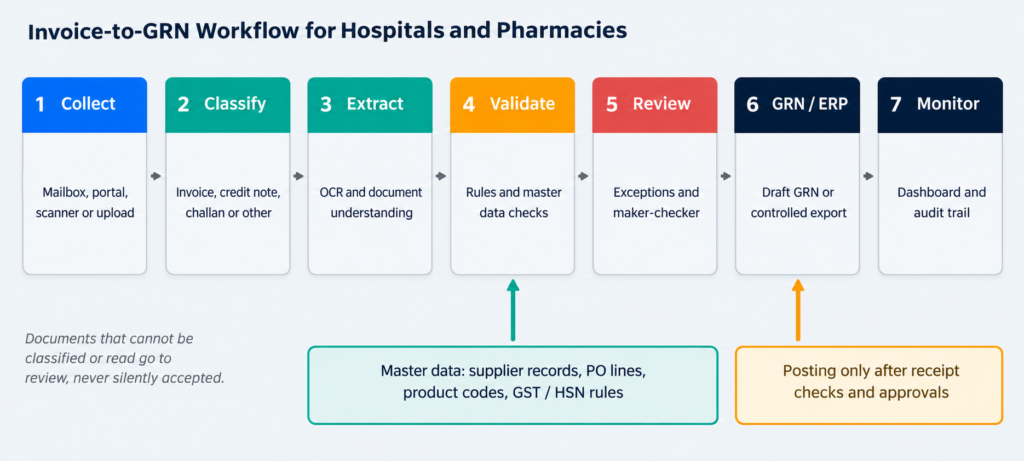
Figure 1. Invoice-to-GRN workflow. Actual integrations and performance depend on deployment configuration.
Step 1: Collect Invoices Securely
Invoices can enter through a monitored mailbox, supplier portal, document scanner or manual upload. The system stores the original document, source details, timestamp and an immutable processing identifier. Attachments should be scanned for malicious content, and access should be restricted by role.
Step 2: Identify and Classify Documents
Document AI determines whether an attachment is an invoice, credit note, delivery challan or an unrelated file. Unsupported or unreadable documents move to a review queue instead of being silently accepted.
Step 3: Extract Invoice and Medicine Data
OCR and document-understanding models identify invoice header fields and line-item tables. Common fields include vendor name, GSTIN where applicable, invoice number and date, PO number, product description, pack size, batch, expiry, quantity, unit rate, discount, taxable value, tax and grand total. Confidence scores can help prioritize review, but they must not be treated as proof of correctness.

Figure 2. Illustrative extraction and validation on a synthetic sample invoice. This is not a customer document.
Step 4: Validate Against Business Rules and Master Data
Validation checks can include:
- Arithmetic reconciliation of line items, tax and totals
- Duplicate invoice detection
- Supplier master matching and PO line matching
- Product-code mapping, GST and HSN checks
- Expiry-date rules
Ambiguous drug names or unmatched line items should be escalated for human review. A robust workflow also distinguishes extraction errors from genuine supplier discrepancies, because each needs a different response.
Step 5: Review Exceptions and Approve
Pharmacy, receiving or finance personnel inspect flagged fields beside the source invoice. The application should show what was changed, by whom and when, with configurable maker-checker approvals for sensitive transactions.
Step 6: Create the GRN or Export to ERP
Once required approvals and physical receipt checks are complete, validated invoice data can populate a draft GRN or be sent through a controlled API or import process. Posting must follow the hospital’s inventory and accounting rules. Invoice OCR alone should not automatically confirm that goods were received.
Step 7: Monitor the Dashboard
An operations dashboard can show incoming documents, processing status, extraction exceptions, average handling time, posting failures and reconciliation queues. Teams should be able to filter by supplier, facility, date and processing outcome.
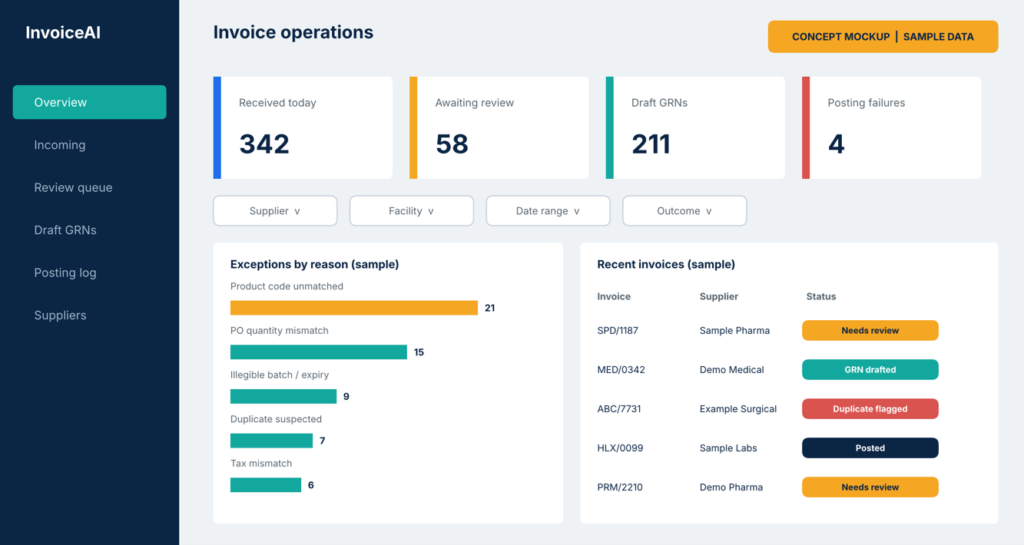
Figure 3. Concept mockup of an operations dashboard using sample data. This is not a customer screenshot.
Which Fields Should a Pharmacy Invoice OCR System Extract?
A healthcare-focused system should capture header, stock, commercial and operational fields, and each group needs its own checks:
Category | Example fields | Typical validation |
Supplier / header | Supplier name, GSTIN, invoice number, invoice date, PO reference | Supplier master match, duplicate check, GSTIN format |
Medicine / stock | Drug name, SKU or item code, batch, expiry, pack size, quantity | Product-code mapping, expiry rules, PO line match |
Commercial | MRP, unit rate, discount, taxable amount, GST / HSN, total | Arithmetic reconciliation, tax and HSN checks |
Operational | GRN reference, matched PO line, review status, exception reason | Generated by the workflow; feeds audit and dashboard |
AI-Assisted vs. Manual Invoice Processing
Dimension | Manual processing | AI-assisted processing |
Intake | Mailboxes, paper and folders | Monitored intake with stored originals and identifiers |
Data entry | Typed by hand into pharmacy or ERP screens | Extracted automatically and reviewed by exception |
Supplier layouts | Staff adapt case by case | Models handle many layouts; unfamiliar ones go to review |
Validation | Depends on individual diligence | Rules applied consistently against master data |
Duplicate detection | Memory and spreadsheets | Automated comparison with processed history |
Approvals | Informal or paper-based | Configurable maker-checker with a change log |
Traceability | Scattered emails and notes | Original file, edits, reviewer and time recorded |
Visibility | Status obtained by asking around | Dashboard filtered by supplier, facility and outcome |
Role of staff | Typing and checking everything | Resolving exceptions and confirming receipt |
Invoice, Purchase Order and GRN: Keeping Controls Intact
The purchase order records what was ordered, the invoice records what the supplier billed, and the GRN records what physically arrived. Automation speeds up the invoice side, but it must not collapse these three into one. Extracted invoice data alone cannot verify physical receipt, clinical suitability or inventory correctness.
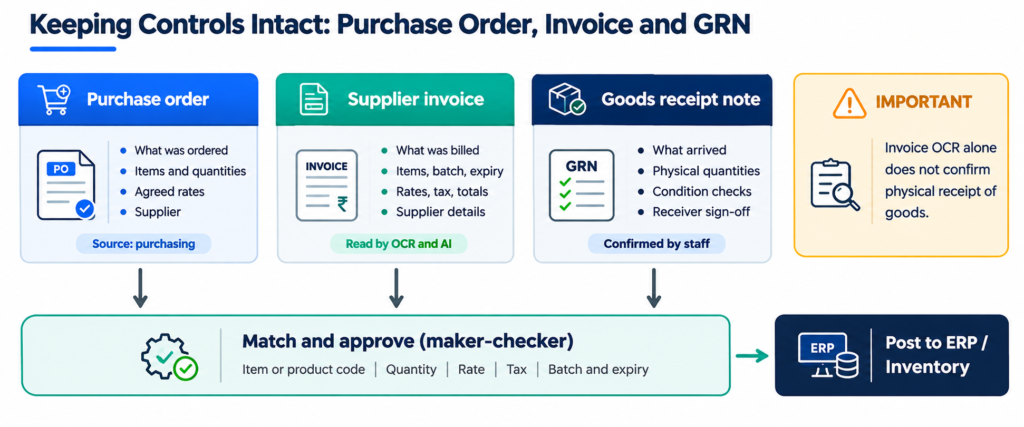
Figure 4. Matching purchase order, invoice and GRN before posting.
In practice this means the system prepares a draft GRN from validated invoice data, receiving staff confirm quantities and condition, and posting follows the hospital’s inventory and accounting rules.
What Does Successful Deployment Require?
Deployments tend to succeed when they follow a staged approach:
- Start with representative samples from different suppliers, including low-quality scans and complex tables.
- Define metrics early: field-level accuracy measures and exception thresholds.
- Integrate master data and receiving workflows early, not after model development.
- Pilot with a limited supplier group and compare AI output against verified records.
- Expand in stages, measuring both extraction quality and the correctness of approved ERP transactions.
Security, Privacy and Compliance Considerations
Healthcare organizations should assess data classification, retention, encryption, role-based access, audit logs, vendor access and deployment location. On-premises or private-cloud processing may be appropriate where institutional policies require tighter control.

Figure 5. Reference deployment with processing inside a controlled environment. Suitability depends on infrastructure and policy.
COMPLIANCE NOTE
Any legal or regulatory compliance claim must be reviewed against the hospital’s jurisdiction, contracts and applicable requirements. This article does not claim that any solution is compliant with a specific regulation
Can AI Process Thousands of Hospital Invoices per Day?
SHORT ANSWER In principle, yes, with queued ingestion, parallel workers, autoscaling where available and resilient ERP integrations. Actual throughput depends on page count, image quality, model choice, hardware, validation complexity and human-review rates. Any capacity or turnaround claim should be backed by clearly defined, reproducible benchmark results. |
When a vendor quotes a figure, ask what stands behind it. A credible benchmark states:
Benchmark detail | What to ask for |
Test dataset | Size, supplier mix, scan quality and document types, ideally including difficult samples |
Hardware | The infrastructure and models used during the test |
Measurement definition | What counts as processed: extracted, validated, reviewed or posted |
Date and conditions | When the test ran and the load applied |
Exceptions | Failure and human-review rates, not just the successful cases |
GHow to Measure ROI
A credible ROI assessment uses your real invoice mix rather than generic savings percentages. Compare baseline and post-deployment values for:
- Manual handling time and cost per invoice
- Exception rate and correction effort
- Turnaround time and GRN cycle time
- Duplicate detection
Then include the full cost side: integration, infrastructure, model inference, maintenance and human-review costs.
How AI India Innovations Can Help
AI India Innovations develops customized OCR and document automation workflows for healthcare operations, including invoice extraction, validation dashboards and integration with pharmacy or enterprise systems.
A discovery engagement can assess invoice samples, required fields, integration constraints, security needs and pilot success criteria before proposing a deployment architecture and commercials.
WHAT TO BRING TO A DISCOVERY CALL • A small, de-identified sample set of supplier invoices • A list of target ERP or pharmacy-system fields • Your security and deployment constraints |
Frequently Asked Questions
Yes. OCR and document-understanding models can extract text and fields from scanned invoices. However, low-resolution images, handwriting and complex layouts may need human correction, so a review queue for unclear documents is part of a dependable workflow rather than an afterthought.
Yes, when these fields are present and legible on the invoice. Because errors can carry operational risk, extracted batch and expiry values should be validated against supplier, purchase-order and inventory records before operational use, and unreadable or inconsistent values should be escalated to a pharmacy or receiving reviewer.
It can prepare structured data or a draft GRN, but it cannot confirm that goods arrived. Final posting should respect goods-receipt confirmation, approval controls and the hospital’s ERP workflow, so a document read by OCR is never treated as proof of physical receipt.
No. Its primary role is to reduce repetitive data entry and route exceptions to staff. Human review remains important for mismatches, ambiguous products and inventory-critical fields, and staff time shifts from typing toward checking and decisions.
Depending on the model and architecture, processing can be deployed on-premises or in a controlled private environment, so documents need not leave the organization’s boundary. Feasibility depends on available infrastructure, model requirements and integration needs, and should be confirmed during discovery.
AI India Innovations helps businesses develop intelligent automation solutions through custom computer vision, embedded AI, object detection, industrial monitoring, and AI-driven process optimization. These capabilities support smarter manufacturing, automated visual inspections, and more efficient industrial workflows. For businesses exploring robotics simulation using technologies such as NVIDIA Omniverse and Isaac Sim, AI India Innovations' AI development expertise can support complementary perception and automation requirements, while specific simulation integration capabilities should be confirmed during project consultation.
NEXT STEP Interested in AI Invoice Automation? Want to simplify invoice processing in your hospital or pharmacy? Get in touch with us to explore how AI automation can help your organization. Let's connect and discuss your requirements! connect.aiindia@gmail.com |