AI Invoice Automation Using AI Agents and OCR:
Process 10,000 Invoices Daily
Intruduction
Finance teams in hospitals, manufacturers, distributors and shared-service centres receive invoices as email attachments, scanned copies and portal uploads, in dozens of different layouts. Someone has to open each one, identify the supplier, key in the values and check the totals. This article explains how an AI-driven workflow takes over that repetitive work: how it is built, how it validates what it reads, what it takes to design for around 10,000 invoices a day, and what to measure before trusting any performance number.
KEY TAKEAWAYS • AI invoice automation is a pipeline of classification, OCR, AI-based extraction, validation and integration, not OCR alone. • Exceptions are a first-class step. Duplicates, tax mismatches and poor scans go to human review instead of straight into the ERP. • A throughput of 10,000 invoices per day and a dashboard turnaround of about 30 seconds are design targets. They need to be proven with benchmarks on your own documents. • Integration with SAP, Tally or any other ERP is scoped per project and confirmed in a proof of concept. |
What Is AI Invoice Automation?
SHORT ANSWER AI invoice automation uses artificial intelligence, optical character recognition, and document processing workflows to extract, verify, and organize information from invoices. It reduces manual data entry and can integrate extracted information into accounting software, ERP systems, and financial dashboards. |
It helps to separate three ideas that are often blended together:
- OCR (optical character recognition) converts the image of a page into machine-readable text and records where each piece of text sits.
- AI extraction (intelligent document processing) interprets layout and context to decide which text is the invoice number, which is the purchase order number, and which is the grand total.
- Workflow automation applies validation rules, routes exceptions to people, and delivers clean data to dashboards and business systems.
A complete solution combines all three. OCR alone gives you text; it does not tell you whether that text is a valid, non-duplicate invoice that is ready to post.
Why Traditional Invoice Processing Is Inefficient
Manual and template-based invoice handling has well-known weak points, and they compound as volume grows:
- Manual data entry. Every field typed by hand costs time and invites errors such as a transposed digit in an amount.
- Format variety. Each supplier uses its own layout. Template-based tools need a new template per layout and can break when a supplier changes theirs.
- Scattered intake. Invoices land in shared mailboxes, personal inboxes, chat attachments and paper scans, so there is no single queue to manage.
- Late detection of problems. Duplicates, wrong GST details and arithmetic errors are often found after posting, or at payment time.
- Limited visibility. Without structured data, it is hard to see how many invoices are waiting, where they are stuck, or which suppliers generate the most exceptions.
How AI-Powered Invoice Automation Works
A production workflow is a pipeline of five stages. Each stage has a clear input, a clear output, and a defined path for anything that goes wrong.
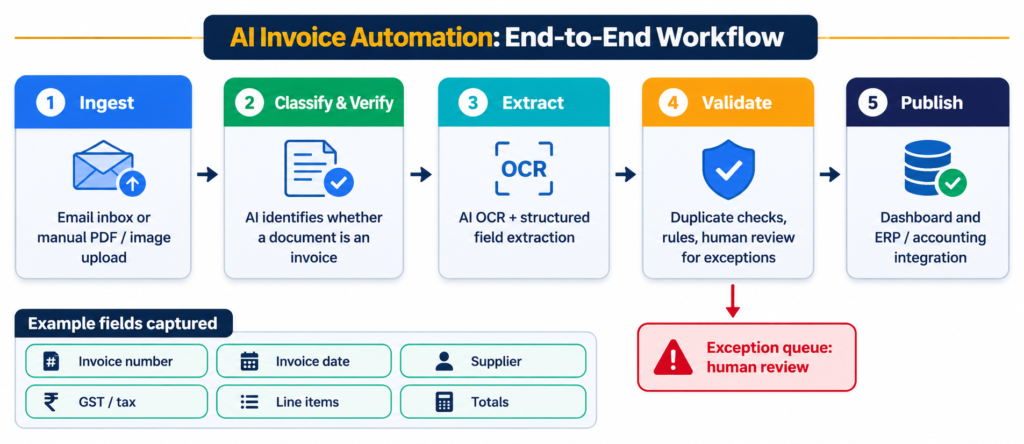
Figure 1. End-to-end workflow from invoice intake to dashboard and ERP. Actual integrations and performance depend on deployment configuration.
Step 1: Receive Invoices via Email or Upload
A mailbox connector watches designated inboxes and collects attachments. Users and suppliers can also upload PDFs or images through a web portal or an API. Each file is stored in its original form, given a unique identifier, and placed on a processing queue. Keeping the original supports audit, and the queue means a sudden surge of arrivals is buffered rather than dropped.
Step 2: Verify and Classify Invoice Documents
Not every attachment is an invoice. Mailboxes also receive email signatures, statements, purchase orders, credit notes and terms and conditions. An AI classification model determines the document type and whether it appears to be a genuine invoice before any expensive extraction is attempted. Non-invoices are filtered out or routed to the right team, and files that are unreadable, blank or badly rotated can be flagged early.
Step 3: Extract Data Using AI OCR Models
OCR reads the text and its position on the page. AI models then map that text to business fields: invoice number, invoice date, supplier name and GSTIN, buyer, line items (description, quantity, rate, tax, amount), tax totals and the grand total. The result is structured data, such as JSON or a table, that downstream systems can consume directly.

Figure 2. Illustrative extraction from a synthetic sample invoice. This is not a customer document.
Dense line-item tables, multi-page invoices, skewed scans and low-resolution photos are harder to read than clean digital PDFs. That is exactly why a validation stage follows extraction.
Step 4: Validate Extracted Invoice Information
Validation turns raw extraction into data a finance team can trust. Typical checks include:
- Completeness: required fields such as invoice number, date, supplier and total are present.
- Arithmetic: line items add up to the subtotal, and subtotal plus tax equals the total.
- Tax: GSTIN format and checksum, and consistency between the tax rate and the tax amount.
- Duplicates: comparison of supplier, invoice number, date and amount against previously processed invoices.
- Master data: the supplier exists in your records and, where applicable, the invoice matches a purchase order.
An invoice that fails any rule is not pushed onward. It enters an exception queue with the reason attached, a reviewer corrects or rejects it, and the action is logged.
Step 5: Send Results to Dashboard or ERP
Validated records are published to a dashboard showing volumes, statuses and exceptions, and passed to accounting or ERP systems through APIs, file exports or connectors. How fields map to ledgers, vendor codes and tax codes is specific to each system and process, so integrations are scoped and tested per project.
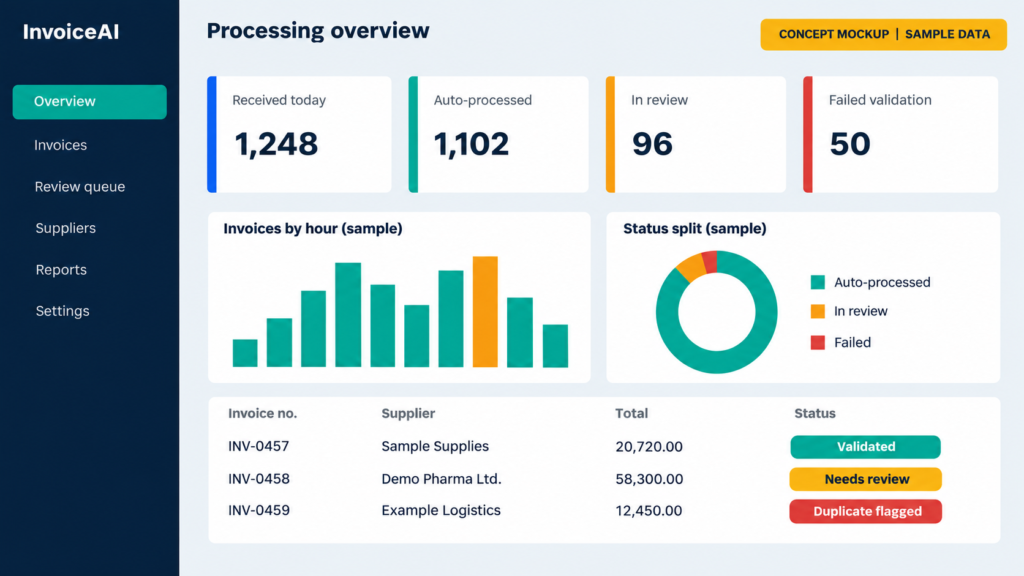
Figure 3. Concept mockup of a monitoring dashboard using sample data. This is not a customer screenshot.
Processing 10,000 Invoices Daily: Architecture and Scalability
DESIGN TARGET, NOT A VERIFIED RESULT A dashboard turnaround of about 30 seconds and a volume of 10,000 invoices per day are design targets for this architecture. They should be presented as production results only after benchmarking under documented conditions. |
What does 10,000 invoices a day mean in practice? Spread evenly over 24 hours it is roughly 417 invoices per hour, or about 7 per minute. Concentrated in an eight-hour working window it is about 1,250 per hour, or roughly 21 per minute. Real arrivals are rarely even: month-end and supplier batch sends create bursts, so peak load matters more than the daily average.
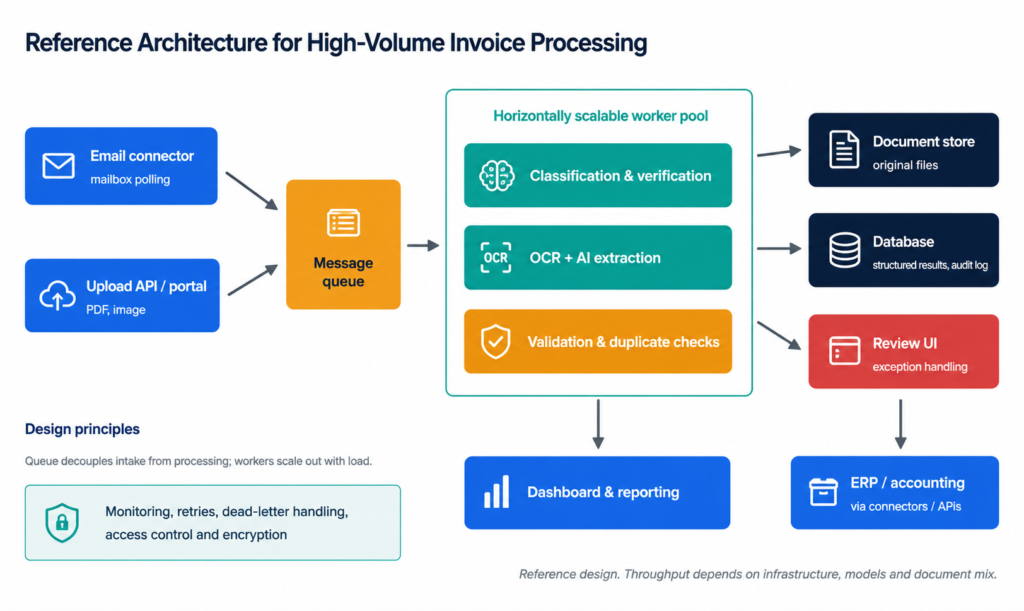
Figure 4. Reference architecture for high-volume processing. Throughput depends on infrastructure, models and document mix.
Several design principles make high volumes manageable:
- Decouple intake from processing with a queue, so bursts are buffered instead of dropped.
- Scale workers horizontally. Classification and extraction can scale independently, on CPU or GPU as the models require.
- Make processing retry-safe, so a failed worker or a re-delivered message does not create duplicate records.
- Store originals and results separately, with an audit trail of every change and review action.
- Monitor what matters: queue depth, per-stage latency, error rates and exception rates, with alerts.
- Build in security: encryption in transit and at rest, role-based access and retention rules aligned with your policies.
Before quoting any performance figure, measure it:
| Metric | What it tells you | How to test it |
|---|---|---|
| End-to-end latency | Time from receipt to dashboard | Report median and 95th percentile on a defined invoice mix. |
| Sustained throughput | Invoices processed per hour | Load test with representative files on fixed hardware. |
| Field-level accuracy | Share of extracted values that are correct | Compare against a human-verified ground-truth set, field by field. |
| Exception rate | Share of invoices routed to review | Run on real samples across many suppliers and scan qualities. |
| Concurrency | Behaviour under parallel arrivals | Simulate burst uploads and mailbox floods. |
Benefits of AI Invoice Processing
Outcomes depend on volume, document mix and how mature the current process is, so treat the following as areas of potential improvement rather than guaranteed savings.
- Less repetitive data entry, freeing finance staff for review, reconciliation and supplier queries.
- Faster visibility. Invoices appear in a dashboard shortly after arrival instead of waiting in an inbox.
- Earlier error detection. Duplicates and arithmetic or tax inconsistencies are caught before posting.
- Stronger auditability. The original file, extracted values, corrections and reviewers are all recorded.
- Operational insight. Leaders can see backlog, exception causes and supplier-level trends.
- Peaks are handled by adding processing capacity rather than temporary headcount.
AI Invoice Automation vs. Manual Processing
| Dimension | Manual Processing | AI-Assisted Automation |
|---|---|---|
| Intake | Scattered inboxes and folders | Single queue fed by email and uploads |
| Data entry | Typed by hand | Extracted automatically, reviewed by exception |
| New layouts | Staff adapt case by case | Models handle many layouts; unfamiliar ones are flagged |
| Validation | Depends on individual diligence | Consistent rules applied to every invoice |
| Duplicate detection | Memory and spreadsheets | Automated comparison with processed history |
| Visibility | Status obtained by asking around | Live dashboard of volumes and exceptions |
| Audit trail | Emails and notes | Logged actions linked to the original file |
| Scaling | Add staff | Add processing capacity |
| Role of people | Typing and checking everything | Reviewing exceptions and making decisions |
Industries That Benefit from Invoice Automation
Any organisation that receives large numbers of supplier invoices can benefit. These sectors see the pattern most often:
| Industry | Why it fits |
|---|---|
| Hospitals and pharmacies | Many suppliers of drugs, consumables and equipment, with detailed line items and tax data |
| Manufacturing | Frequent raw-material, spare-part and service invoices that must tie back to purchase orders |
| Retail and distribution | High invoice counts from numerous vendors, often with seasonal peaks |
| Logistics and transport | Recurring freight and fuel invoices in varied formats |
| Shared services and finance outsourcing | Processing at scale for multiple business units or clients, where consistency and audit trails matter |
How AI India Innovations Builds Invoice Automation Solutions
Enterprise AI invoice automation by AI India Innovations. AI India Innovations develops customised AI-powered invoice processing solutions that combine intelligent document recognition, OCR, automated data extraction, validation workflows and enterprise system integration.
The solutions are designed to help organisations reduce repetitive manual work, accelerate document processing and improve operational visibility across finance, procurement and administrative workflows. From invoice ingestion and structured extraction to validation dashboards and ERP integration, the aim is to implement automation tailored to your existing processes.
A typical engagement covers:
- Workflow discovery with finance, procurement and IT teams
- Analysis of your real invoice samples and fields
- Extraction configuration and validation rules, including exception handling
- Dashboard and reporting design
- Integration with your accounting or ERP environment
- Security, access control and audit logging
- A benchmarked proof of concept with agreed test conditions
Scope, integrations and performance are defined per project and confirmed during the proof of concept.
Frequently Asked Questions
Yes. A mailbox connector can collect incoming messages and attachments, and AI models can read PDF or image invoices, including scanned ones, to extract fields such as invoice number, date, supplier, tax and totals. Reliability depends on document quality, layout variety and configuration, so unclear documents should be routed to human review.
Accuracy varies with scan quality, layouts, languages, handwriting and the type of field, so no single figure applies to every deployment. Measure it on your own invoices, field by field, against a human-verified sample. Validation rules and human review then catch remaining errors before data reaches finance systems.
It is a reasonable design target for a queue-based, horizontally scalable architecture, but it must be confirmed by a benchmark. Ten thousand invoices a day averages about 417 per hour around the clock, or about 1,250 per hour in an eight-hour window. Peak bursts, document complexity and hardware decide whether a deployment meets it.
OCR converts a document image into machine-readable text. AI invoice automation goes further: it classifies the document, identifies and structures the fields, validates them against rules, handles exceptions and sends results to dashboards or ERP systems. OCR is one component of the workflow, not the whole solution.
Integration is generally possible through APIs, file exports or database connectors, but each target system must be scoped and tested individually. Supported connectors and field mappings depend on the project, so confirm the specific system, version and posting process in a proof of concept before assuming compatibility.
Validation rules compare each new invoice with earlier records, for example supplier, invoice number, date and amount, to flag likely duplicates. GST checks can include GSTIN format and checksum, tax-rate consistency and arithmetic. Records that fail are not published automatically; they go to an exception queue for review.
The invoice is held back from dashboard and ERP posting and moved to an exception queue with the reason it failed, such as a missing field, a total mismatch or a suspected duplicate. A reviewer corrects or rejects it, and the action is logged for audit. Patterns in corrections can also guide rule tuning.
Interested in AI Invoice Automation?
Want to simplify invoice processing? Get in touch with us to explore how AI automation can help your organization.
Let’s connect and discuss your requirements!