
What should speech to text testing measure?
Speech to text testing for noisy warehouse calls should replay representative audio and check whether the transcript preserves the instructions people act on. Label dock numbers, quantities and negations. Score those fields alongside word error rate and review time. Route unclear instructions to a dispatcher before they reach the warehouse system.
Imagine a driver says “leave it at dock fourteen,” but the transcript says “dock forty.” The sentence still reads well. The wrong dock can send a load to the wrong team. Build the pilot around an error like this, and record what the dispatch workflow does when it occurs.
Prepare audio for speech to text testing
Start with recordings from the call path you intend to deploy. Include a quiet baseline and busy clips with background equipment, overlapping voices or clipped words. Document the device, channel, call conditions and speaker mix for each clip. Secure permission for any real recordings and use staged calls where sharing real examples would expose private information.
Give each clip an identifier. Have a reviewer label the reference transcript and the fields the dispatcher needs. Mark inaudible information as unclear. If two reviewers disagree about the dock or quantity, preserve the ambiguity in the answer key so a model gets no credit for guessing.
Keep evaluation files separate from examples used to tune the system. If you compare a cleaned recording with its original, run both versions against the same human reference. Change one variable per run and save the model version, settings and audio preparation alongside the result.
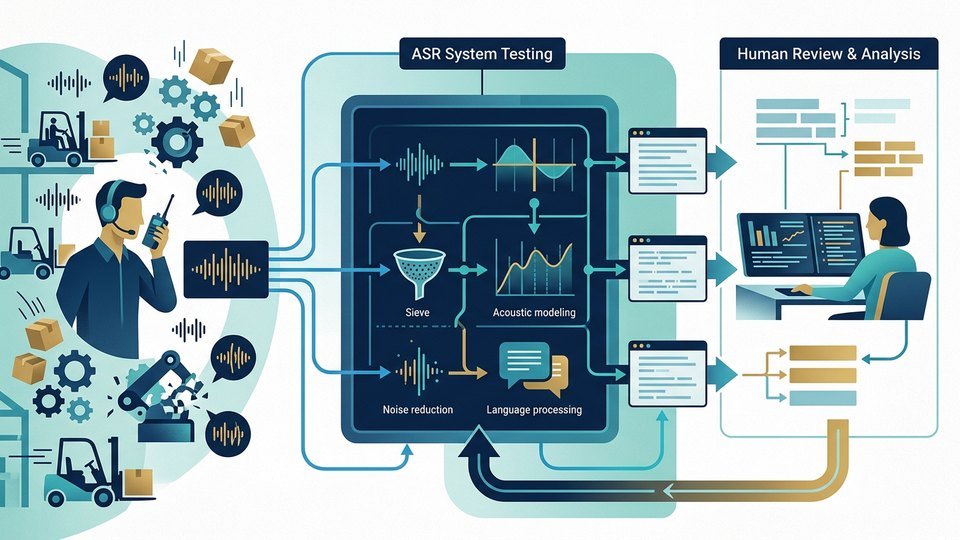
AI India Innovations’ approach to a warehouse pilot
Use this proposed design to set up a reviewable pilot. Keep the transcript and the dispatch decision as separate outputs. The system may suggest a dock number or quantity, while a validation step checks those fields against the dispatch record. Unclear or conflicting values go to a reviewer with the relevant audio snippet.
A reviewer needs enough context to resolve the issue without replaying the entire call. Show the original clip, the proposed transcript, the disputed field and the source record. Save the reason for each correction so the team can turn recurring errors into new test cases.
For a related system design, read our AI in voice guide. The hospital form digitization article covers another workflow where extracting a field and deciding how to use it are separate tasks.
Run the speech to text testing pilot
Workflow at a glance
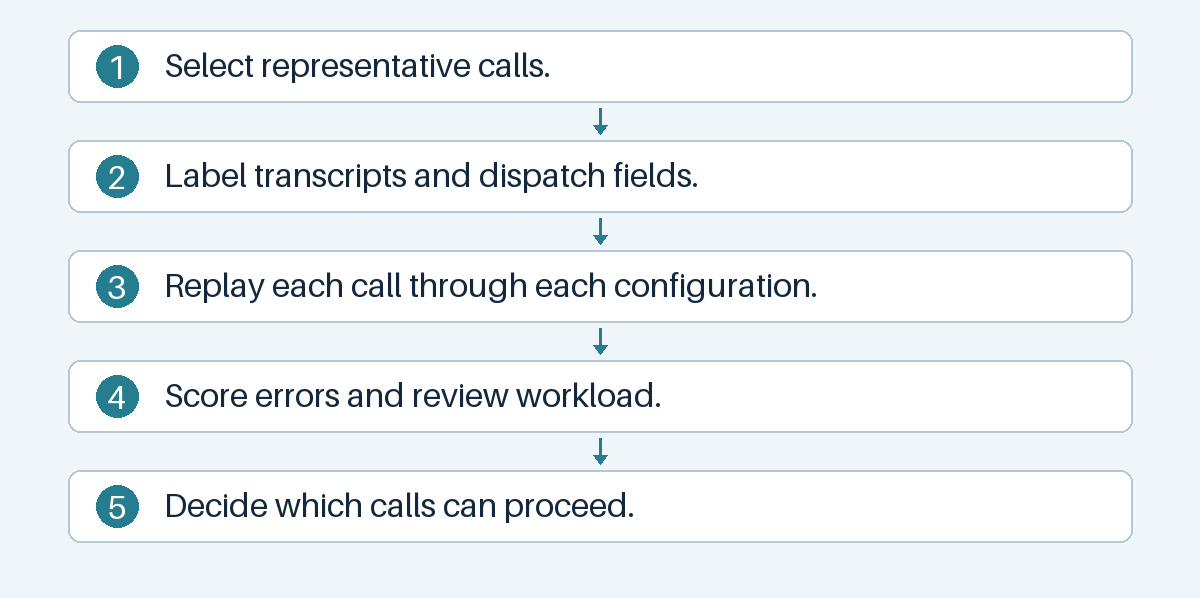
- Select representative calls.
- Label transcripts and dispatch fields.
- Replay each call through each configuration.
- Score errors and review workload.
- Decide which calls can proceed.
Replay and score
Feed identical audio into each candidate setup. Keep a separate row for each clip and configuration. Record missing words, inserted words and substitutions. Use the same rules for normalizing punctuation and numbers in each run. Microsoft’s speech evaluation guide explains how these error types contribute to word error rate.
Track dispatch fields separately. For a spoken instruction like “hold dock seven,” a reviewer should check the action and dock value. Count an unanswered or unclear field separately from an incorrect value. Then log whether the system asked for review before it sent the instruction downstream.
Measure the review burden on the same test set. Record the time from the end of the instruction until a usable transcript appears. Then record how long it takes a person to resolve flagged clips. Look at the results by noise and device so an easy group of calls does not hide a difficult one.
Compare deployment options and failure modes
Review errors in their original context. If a quantity changes only when two people talk over each other, add clips with overlapping speech. If the transcript loses the first word when a radio opens, compare the raw audio with the recording the model received. Each observed failure should become a test you can repeat after a change.
Conclusion
Run the pilot before linking a transcript to a dispatch action. Agree in advance which fields are critical and what the team should do when those fields are unclear. Keep a frozen set of reference calls and add new failure cases separately. Use both sets when evaluating the next model or configuration.
Frequently Asked Questions
What is the difference between word error rate and dispatch field accuracy?
Word error rate measures differences across the transcript. Dispatch field accuracy checks values people act on, such as a dock number or pallet count. Use both metrics so a readable transcript with a wrong instruction remains visible in the results.
How do you test speech recognition in background noise?
Collect clips at the actual call points, or stage calls with representative equipment noise and overlapping voices. Label the clips and replay the same audio through each configuration. Compare results by recording condition and inspect mistakes in critical fields.
When should you rerun the pilot?
Rerun the same reference set after a change to the speech model, audio path, preprocessing or dispatch field rules. Include recent failure cases in a separate set so you can see whether the change fixes the problem it was intended to address.